
The change rolls out across two dates, July 30 and July 31, 2026, as a two-step phase-down rather than a sudden cut-off. Switching to your own model takes about a minute, and this post walks you through it.
What’s Changing
Up until July 30, 2026, paid workspaces received $200/day of free credits on our managed model, resetting daily at midnight UTC.
We’re winding that subsidy down in two steps:
Step 1: We reduce the daily free allowance from $200/day to $50/day. Your managed model keeps working exactly as before. The only difference is the size of the daily free allowance.
Step 2: We retire the free managed credits entirely. After this step, paid workspaces run the managed model on their own purchased credits, or bring their own model or API key (more on that below).
That’s the whole change. The managed model itself isn’t going away. We’re winding down the portion of it we’ve been giving away for free.
Why We’re Making This Change
The honest answer: giving away managed inference at scale isn’t sustainable for a small team. Every request to our managed model has a real cost, and $200/day per workspace adds up quickly across everyone who uses it.
Rather than quietly degrade the experience or spring a surprise bill on anyone, we’d rather be transparent and shift toward something that’s better for you in the long run: direct control over your own model and better economics through your own keys. When you bring your own model, you pay your provider directly at their rates, you’re not subject to our subsidy, and you decide exactly which model powers your agent.
The Timeline
Here’s the plan. The two steps land on consecutive dates, so if you rely on the managed model, connecting your own is the thing to sort out.
Through July 29, 2026: Paid workspaces get $200/day of free managed credits.
Step 1, July 30, 2026: The daily free allowance drops from $200/day to $50/day.
Step 2, July 31, 2026: Free managed credits are retired. Paid workspaces use their own purchased credits or bring their own model / API key.
If you rely on the managed model, we recommend connecting your own before July 30, 2026. If a date shifts, we’ll update this post.
Your Agent Won’t Suddenly Break
We want to be clear about this: your agent will not stop working. It’s a two-step phase-down, not a hard cut-off. The daily allowance shrinks first, then goes away. And if your workspace has purchased credits, the managed model keeps running on those after Step 2. You just start paying for that inference at cost instead of having it subsidized.
Still, with the two steps on consecutive dates, the surest way to avoid any disruption is to bring your own model or API key before July 30, 2026. It’s fully supported, it’s always been supported, and it takes it off your plate entirely.
How to Bring Your Own Model or API Key
This is the part that matters most, so here’s the full walkthrough. Bringing your own model has always been supported on Donely, and it stays fully supported. It takes about a minute, and you can do it from any of your agents.
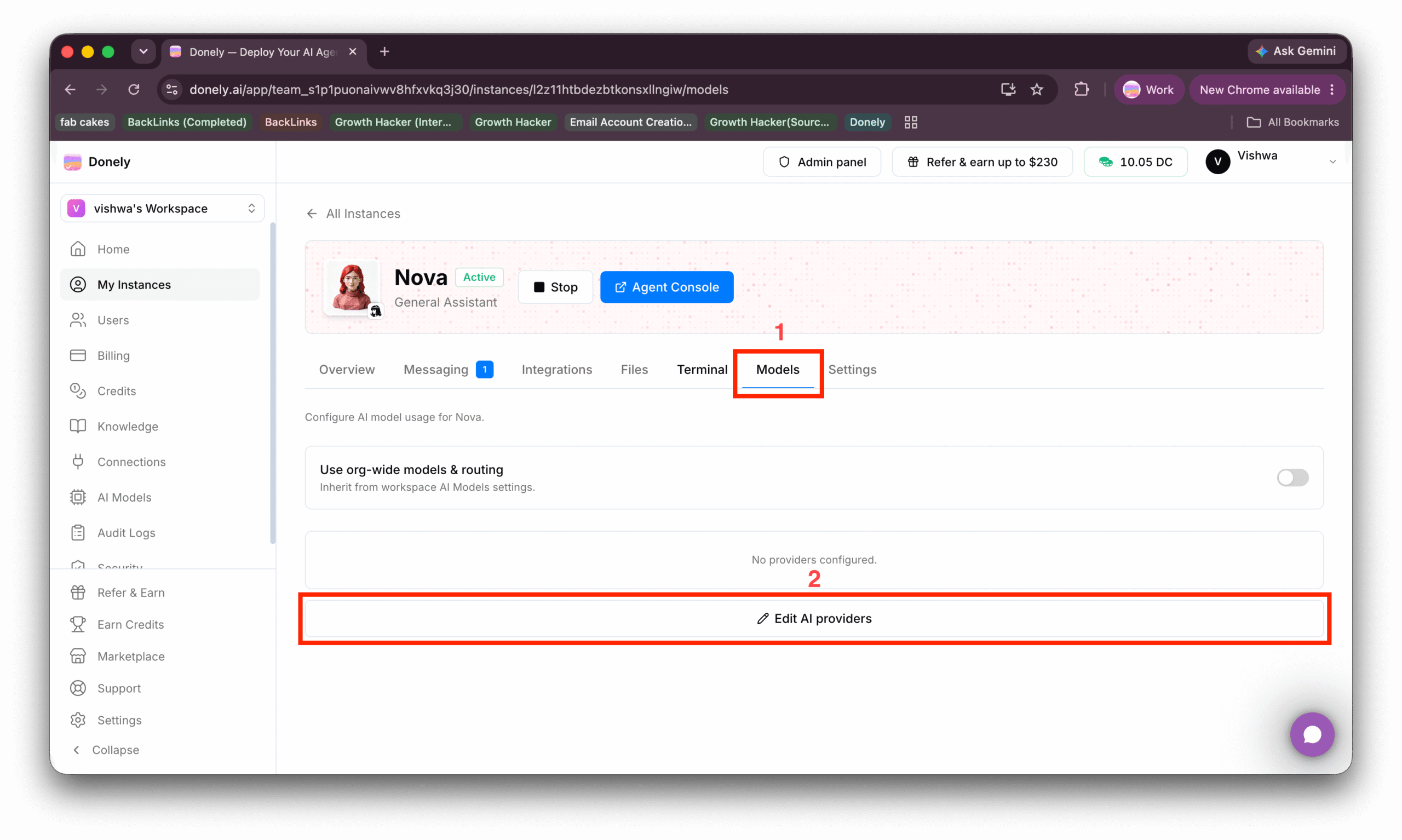
Step 1: Open your agent’s Models tab and click “Edit AI providers.” From your instance, open the Models tab, then click Edit AI providers at the bottom of the panel.
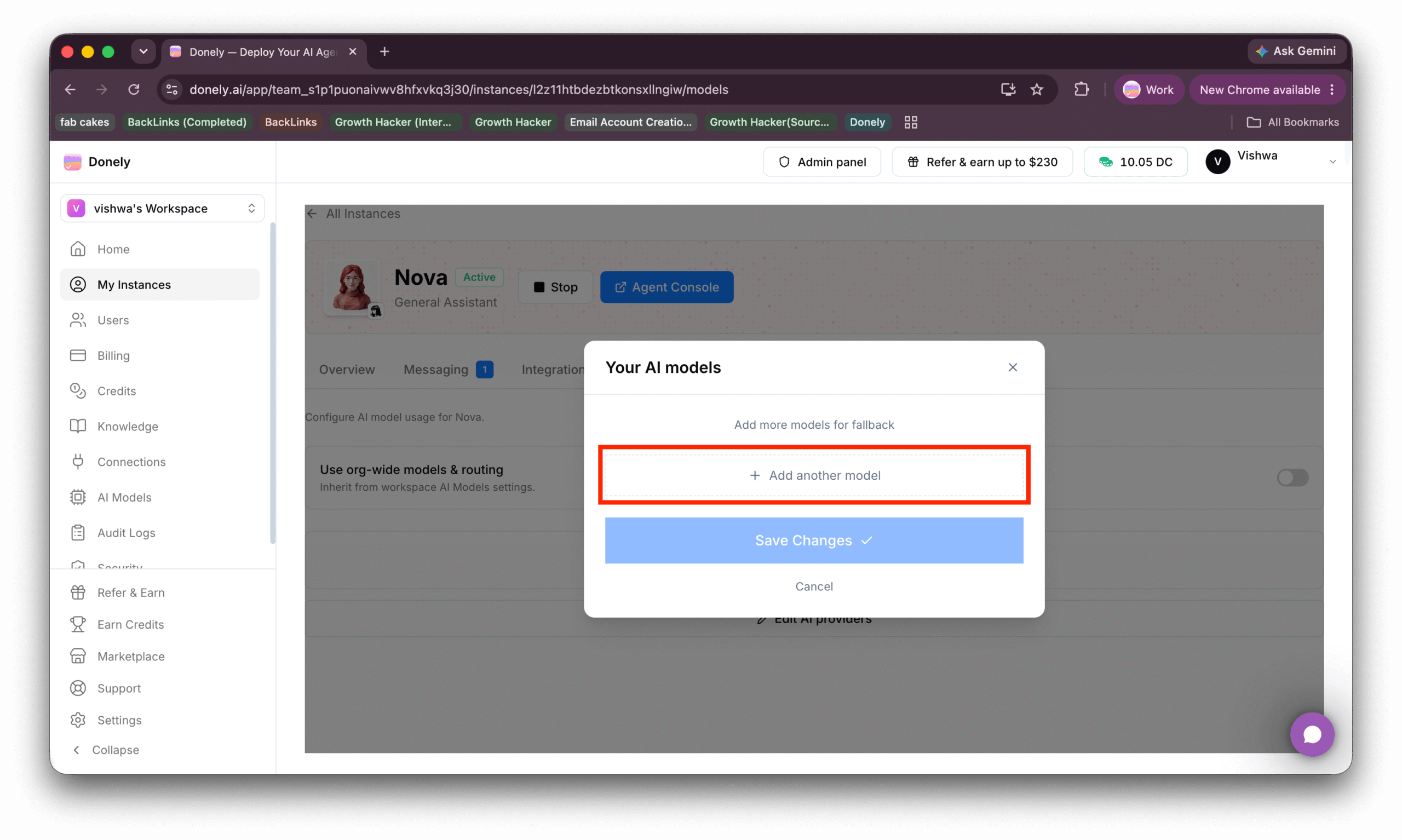
Step 2: Click “Add another model.” In the “Your AI models” window, choose Add another model. You can add more than one; extra models act as fallbacks if your primary is ever unavailable.
Step 3: Choose your provider. To bring your own model, choose Claude, ChatGPT, or OpenRouter, then click the connect button at the bottom. (You’ll also see a Donely AI option on this screen; that’s the managed model this post is about winding down, so skip it.)
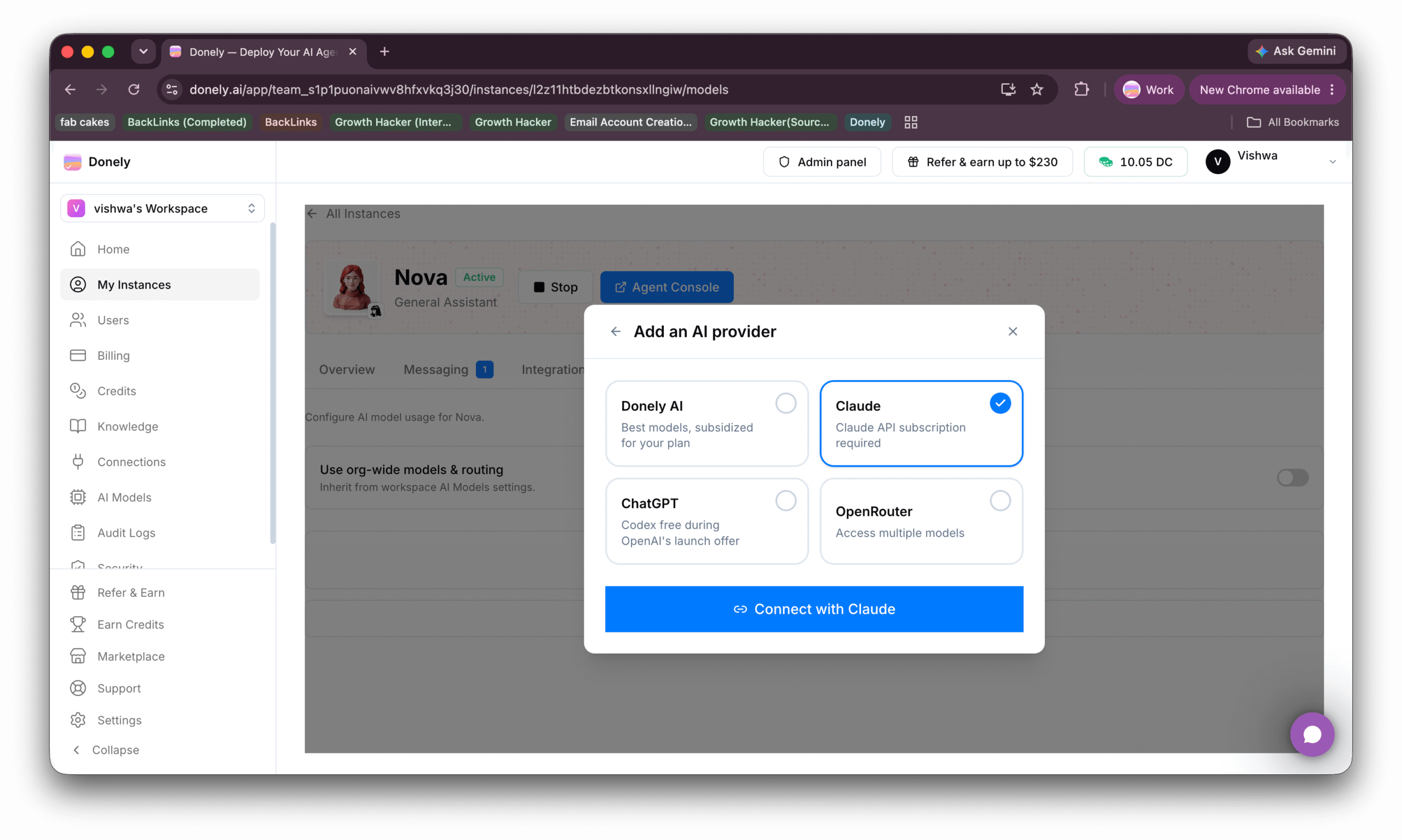
Here’s what each option is and how to connect it:
Claude (Anthropic, via OAuth). Pick “Claude” and choose “Connect with Claude.” The recommended path is OAuth: click “Authorize with Claude,” which opens Claude in a new tab. Log in, approve access, copy the token shown on screen, and paste it back into Donely. Prefer a key instead? Use the “Use API key instead” link and paste an Anthropic key that starts with sk-ant-. You’ll then choose your models (Claude Opus, Sonnet, or Haiku). Good for: teams that want top-tier Claude models using an existing Claude subscription or an Anthropic API plan.
ChatGPT (OpenAI Codex, via OAuth). Pick “ChatGPT” and choose “Connect with ChatGPT.” Click “Authorize with ChatGPT” to open ChatGPT in a new tab, log in and approve access, then copy the full callback URL from your browser’s address bar and paste it back into Donely. Good for: anyone who already has a ChatGPT account, and, as we’ll cover next, typically the cheapest way to run your own model.
OpenRouter (via API key). Pick “OpenRouter” and choose “Connect with OpenRouter.” OpenRouter connects with an API key rather than OAuth, so the key form opens directly. Create a key in your OpenRouter account and paste it (it starts with sk-or-). You can select a model from the list or enter any model ID manually. Good for: reaching hundreds of models from many providers through a single key, with pay-as-you-go pricing.
Once you’ve connected a provider, that’s it: your agent uses your model, and you pay your provider directly. You can switch providers or add more at any time from the same Models tab.
The Cheapest Way to Bring Your Own Model: ChatGPT Codex
If your main worry about the credit changes is cost, here’s the good news: the cheapest option is likely something you may already pay for. Connecting the ChatGPT provider runs your agent on OpenAI’s Codex models, which is typically the most affordable route of the bunch.
Two reasons it tends to come out cheapest:
It’s included with a plan you may already have. Codex is available across ChatGPT plans, including the ChatGPT Plus plan at around $20/month, rather than being billed as separate per-token API usage. If you already subscribe to ChatGPT, connecting it to Donely adds no new bill; your agent simply uses the Codex access your plan already includes.
There’s a launch offer. Donely’s provider screen flags the ChatGPT option as “Codex free during OpenAI’s launch offer.” Promotional offers like this can change on OpenAI’s side, so treat it as a limited-time bonus rather than a permanent price. But while it lasts, it makes Codex the lowest-cost way to bring your own model to Donely.
Compared with the alternatives, that’s hard to beat. Claude bills against a Claude subscription or an Anthropic API plan with credits, and OpenRouter is pay-as-you-go per token across whichever model you pick. Codex, by contrast, rides along on a ChatGPT plan you may already own, with a free launch offer on top while it lasts.
To set it up, follow the three steps above and pick ChatGPT in Step 3, then “Connect with ChatGPT” and authorize with your OpenAI account. That’s the whole thing.
One honest caveat: “cheapest” isn’t always “best fit.” If your workloads lean on a specific model’s strengths, pick the provider that matches; the setup is identical either way. But if you’re optimizing for price, start with Codex.
Questions?
We know changes to pricing and credits can be unsettling, so if anything here is unclear or you want help choosing a provider, reach out. We’re a small team and we read everything. We’d rather over-communicate this than have anyone caught off guard.
Thanks for building on Donely.