
Quick answer — To get a website into search engines, verify ownership in Google Search Console and submit a clean XML sitemap. Just make sure the site is live, unblocked by robots.txt, and free of accidental noindex tags.
Table of Contents
- The Modern Way to Add a Website to Search Engines
- Verification First
- Submit Sitemap and Request Indexing
- Old vs New Search Engine Submission Methods
- Your First Stop: Google Search Console
- Verification and Sitemap Submission Workflow
- Expanding Coverage Beyond Google
- Common Technical Issues That Can Block Indexing
- Monitoring Index Status And Performance Signals
- Common Questions About Adding a Website to Search Engines
The Modern Way to Add a Website to Search Engines

Before you do anything else, run through a couple of practical checks.
- Confirm the production domain is live and returns a 200 status for canonical pages.
- Scan templates for meta robots noindex entries and ensure robots.txt doesn't Disallow important paths.
Key takeaway — Sitemaps and verification only help if crawling is permitted and pages are indexable.
Verification First
Pick a property type in Google Search Console and verify ownership using a DNS TXT record, HTML file, or meta tag depending on your access. Small businesses often use a meta tag if their CMS allows head edits, while agencies usually prefer DNS TXT for domain-wide control.
- Generate an XML sitemap that lists only canonical, indexable URLs.
- Avoid redirects, staging URLs, and parameter bloat in the sitemap.
- Validate the sitemap with an XML validator before submitting.
Submit Sitemap and Request Indexing
Submit the sitemap in Search Console and use the URL Inspection tool for priority pages. Request indexing for time-sensitive pages like product launches or press releases to speed up discovery.
Also, register the same sitemap in Bing Webmaster Tools since Bing powers DuckDuckGo and other engines.
Old vs New Search Engine Submission Methods
The way we submit sites has shifted dramatically over the years. Here is how the old methods stack up against the current workflow.
| Method | Process | Effectiveness in 2026 | Best For |
|---|---|---|---|
| Legacy URL submission | Manual forms and pings | Low | One-off curiosity |
| Verification + sitemap | Verified property and XML sitemap | High | Ongoing publishing workflows |
Relying on manual forms simply does not cut it anymore. The verification and sitemap approach gives search engines the structured data they need to crawl efficiently.
For a comprehensive step-by-step guide, see our article on how to get indexed on Google.
Your First Stop: Google Search Console

When it comes to getting your website indexed, there's no better place to start than Google Search Console (GSC). Since Google still dominates the global search landscape, this free tool is your direct line of communication with the search engine. It's the most powerful lever you can pull.
Getting your site verified and submitting a sitemap through GSC dramatically speeds up how quickly Google discovers your new and updated pages. This is absolutely critical for time-sensitive content, like a big product launch or an important documentation update, where every hour of visibility counts.
From Submission to Conversation
Verification is what gives you control and insight. For a small business site, popping a simple meta tag into the homepage header is often the quickest way to get verified. For larger organizations or agencies managing multiple properties, setting up a DNS TXT record is the gold standard because it covers the entire domain and its subdomains.
But GSC is much more than a simple submission form; it’s a feedback loop. This is where Google tells you exactly what it thinks of your site.
You can use the Coverage report to diagnose indexing errors or dive into the URL Inspection tool to push a high-priority page to the front of the line. These tools take the guesswork out of the equation when you need a critical landing page indexed and live within days, not weeks.
A Practical Game Plan for Prioritizing Pages
When you're ready to get specific pages indexed, don't just submit your sitemap and hope for the best.
- First, pinpoint your most time-sensitive pages—think new blog posts, press releases, or promotional landing pages.
- Use the URL Inspection tool for each one and hit "Request Indexing." Just make sure you're only doing this for the final, public version of the page (the canonical URL).
- Keep a close eye on the Coverage report. It will flag any issues that are holding you back, like accidental
noindextags, redirect chains, or resources blocked by yourrobots.txtfile.
Key Takeaway: Treat Search Console as a living dashboard, not a one-time setup.
Common Problems I See (and How to Fix Them)
Over the years, I've seen the same few issues trip people up time and again.
- Sitemap accepted, but pages aren't indexed? The most common culprit is an accidental
noindextag left on the page or a rule in yourrobots.txtfile that's blocking Google's crawlers. Double-check both. - Staging site URLs in your sitemap? This is a classic mistake. Always remove test or staging URLs before generating your final sitemap and submitting it to Google.
- Mobile usability errors? In 2026, mobile-friendliness isn't optional. GSC will flag these issues, and you should treat them as high-priority, as they can absolutely prevent a page from being indexed.
To stay on top of things, subscribe to email alerts for coverage issues, and make a habit of checking your indexed page count every week to catch any sudden drops. For your most important pages, you can even cross-reference GSC data with your server logs to confirm that Google is actually crawling them.
Verification and Sitemap Submission Workflow
Getting your site indexed starts with proving you actually own it. In Google Search Console, you'll pick between a Domain Property or a URL Prefix Property — the former covers every protocol and subdomain but requires DNS access, while the latter is faster when you're only managing a single host.
Pick the verification method that matches your level of access. DNS TXT records give you the most control for full-domain setups. If you're a developer who deploys files regularly, uploading an HTML file works smoothly. For CMS users who can edit head HTML, a meta tag is the quickest route.
Once verified, generate a clean XML sitemap containing only canonical, indexable pages. Leave out redirects, pagination with index=noindex tags, and any staging subdomains. Run it through a validator or linting tool to catch malformed XML before it causes problems.
Quick Checklist for Sitemap Quality
- Only canonical URLs listed with consistent trailing slashes
- No HTTP-to-HTTPS duplicates or mixed protocols
- Skip parameter-heavy URLs unless they're properly canonicalized
If your sitemap contains redirected or staging URLs, it wastes crawl budget and slows indexing.
Submit the validated sitemap through the Sitemaps report in Search Console. After submission, keep an eye on the Sitemaps panel for acceptance status and the number of discovered URLs. If the count seems off, spot-check a few example URLs to confirm they're reachable and not blocked.
The URL Inspection tool is your friend for testing priority pages and requesting indexing. This comes in handy for time-sensitive content — think product launches or press releases that need to appear fast. Run the inspection until the live version shows as indexable, then request indexing.
A real-world example: During a SaaS launch I worked on, we used URL prefix verification and submitted a sitemap that accidentally included API docs on a staging subdomain. Search Console accepted the file but flagged many URLs as unreachable. After cleaning the sitemap and resubmitting, indexing returned to normal within 48 hours.
Don't forget about Bing — it powers DuckDuckGo and other search engines. Submit the same cleaned sitemap in Bing Webmaster Tools and verify ownership there to get an additional coverage report.
Once your sitemap is ready, understanding exactly how to create it matters for proper submission. For detailed guidance, check these sitemap creation tips for SEO.
Final pre-submission mental checklist before you hit submit:
- Confirm noindex tags and robots.txt allow crawling
- Validate sitemap XML and sample URLs
- Ensure canonical tags match sitemap URLs
- Remove staging or redirected entries
- Verify property ownership and submit to both Google and Bing
Main takeaway — verified ownership plus a clean sitemap speeds discovery and gives you control over indexing behavior.
Expanding Coverage Beyond Google
Google might be your main focus, but adding Bing Webmaster Tools takes minimal effort and pays off in ways you might not expect. It powers results for DuckDuckGo and Yahoo too, and it often catches crawl or indexing issues that Google's tools completely overlooked. Think of it as getting a second diagnostic perspective without having to rebuild your entire workflow.
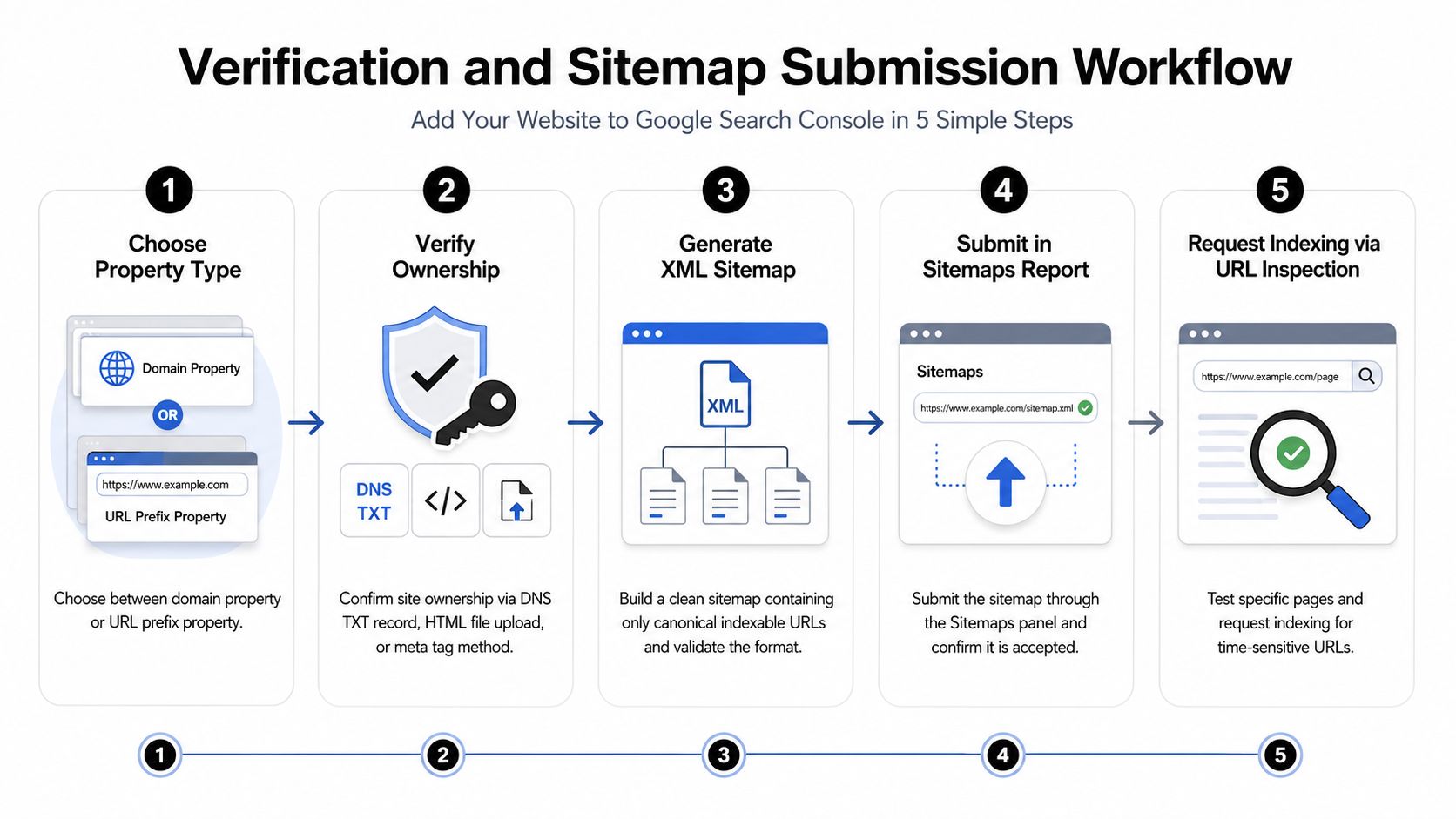
This infographic walks through the Verification and Sitemap Submission Workflow for Google Search Console—five sequential steps that you'll essentially repeat when setting up Bing Webmaster Tools. It maps out the operational flow from choosing your property through to requesting indexing.
Key insight — Submitting the same validated XML sitemap to both Google and Bing increases your coverage and flags issues faster, often within 24–72 hours.
Steps to Extend Coverage
- Verify ownership in Bing using the same DNS TXT record or meta tag you already set up for Google. This keeps your configuration clean and gives you domain-level diagnostics across both platforms.
- Submit the identical XML sitemap you validated in Search Console. When your sitemaps match, you're sending consistent crawling signals to every engine.
- Use Bing's URL Inspection tool to test your priority pages and request indexing for time-sensitive content—product launches, limited offers, or anything with a short shelf life.
Practical Examples
An ecommerce site I worked with had product pages that Google indexed fine but Bing completely missed. After fixing some canonical tag issues and resubmitting the sitemap in Bing, visibility was restored within two days.
A documentation portal avoided a costly duplication problem by using domain verification in both consoles. This surfaced a staging subdomain that had accidentally been included in the sitemap—something neither team had noticed.
Monitoring and Prioritization
- Compare coverage reports side-by-side to catch engine-specific exclusions that might otherwise slip through.
- Prioritize fixes based on business impact first—transactional pages, landing pages, and your highest-traffic guides.
- Set up email alerts in both consoles and schedule weekly checks to monitor indexed page count changes.
Tips and Pitfalls
- Don't submit different sitemaps to different engines. Consistency prevents indexing conflicts that are a pain to untangle later.
- Watch out for robots.txt or noindex rules that might block one engine but not another—this happens more often than you'd think.
- Treat Bing as a low-effort extension of your Google setup, not a completely separate system.
Final takeaway — Adding Bing is a quick resilience play that broadens your reach and surfaces blind spots you might otherwise miss.
Common Technical Issues That Can Block Indexing

Believe it or not, simple misconfigurations in your robots.txt file or meta robots tags are behind a surprising number of indexing failures. I once worked with a dev team that accidentally left Disallow: / on a staging site and then pushed those URLs into the production sitemap. Google and Bing happily accepted the sitemap but, of course, never crawled a single page from it.
You can quickly check for these issues yourself. Just use your browser’s developer tools to inspect the live HTML of a page and look for a meta robots tag. This is the fastest way to spot accidental noindex tags that might have been injected by a CMS template or an A/B testing script. Keep in mind, if a page is blocked by robots.txt, a crawler will never even see a noindex tag on the page itself.
Checking Server Performance and Rendering
Slow server response times and heavy JavaScript can easily stop search engine bots in their tracks before they can even render your content.
A great way to diagnose this is to open a page in Chrome, throttle the network speed in the developer tools, and watch the waterfall chart. This will show you if you have a long Time to First Byte (TTFB) or massive JavaScript bundles that are delaying the page from becoming visible. For an even closer look, crawl simulators like Screaming Frog can be configured to render JavaScript, giving you a much better idea of what Googlebot actually sees.
Key Takeaway: A perfect sitemap means nothing if your content is too slow to load or relies on client-side rendering that crawlers can't process in time.
Using Coverage Reports and Crawler Diagnostics
Instead of guessing, use the free tools at your disposal. The Coverage report in Google Search Console and the Site Scan tool in Bing Webmaster Tools will tell you exactly why certain URLs are being excluded.
Look for statuses like “Discovered — currently not indexed.” From there, you can inspect a few sample URLs to see if they’re being redirected, have a noindex tag, or are blocked by other issues. These reports are massive time-savers compared to digging through server logs.
Here’s a quick audit checklist to help you spot common failures fast:
- Check
robots.txt: Confirm it allows crawlers to access your key pages and isn't blocking your sitemap’s location. - View Page Source: Make sure there are no accidental
noindexmeta tags. - Inspect URLs: Sample about 10 URLs from your sitemap in the URL Inspection Tool to check their indexability and render status.
- Test Network Speed: Run a test on a slow network to see if any client-side rendering issues pop up.
Real-World Examples to Learn From
I’ve seen these issues in the wild time and time again. A retail client once accidentally indexed their password-protected admin area because the development URLs were included in the sitemap. Removing those entries and resubmitting fixed it in a couple of days.
Another time, a large enterprise site with complex faceted navigation was getting tens of thousands of low-value, duplicate URLs indexed. The fix involved adding canonical tags to consolidate the parameters, blocking irrelevant URL patterns in robots.txt, and submitting a much cleaner sitemap.
A few practical tips from experience:
- Always run your sitemap through a validator before submitting it to catch any redirects or non-200 status code pages.
- Use canonical tags consistently. A mismatch between the URL in your sitemap and the canonical URL on the page is a red flag for search engines.
- Completely exclude any staging, preview, or login-protected URLs from your production sitemaps.
The Fifteen-Minute Pre-Submission Audit
Before you hit "submit" on that sitemap, take just 15 minutes to do this quick audit. It can save you weeks of headaches.
First, fetch your robots.txt and double-check that you aren't disallowing important content. Next, spot-check the <head> HTML on 5 of your most important pages for the correct meta robots and canonical tags. Then, validate your sitemap’s XML and run a handful of the URLs through Google’s URL Inspection tool. Finally, do a quick JavaScript render test on a core page and check its TTFB.
Final Thought: Submitting your site is a crucial step, but it’s not enough on its own. This quick audit helps prevent silent failures that waste your crawl budget and delay indexing.
By the way, if you're interested in how hosting choices can impact your site's indexing and performance, you can read our Donely hosting guide for an OpenClaw hosting overview.
Monitoring Index Status And Performance Signals
Monitoring starts the moment you submit your sitemap. It turns a one-time submission into an ongoing process for how you add website to search engines. Begin by tracking total indexed pages over time in Google Search Console and Bing Webmaster Tools. Watch for sudden drops or sluggish growth — both tell you something needs attention.
Check crawl stats weekly to see how often bots visit and which pages they prioritize. This reveals whether Googlebot treats your site as active or low priority. If crawl rate drops, dig into server load, recent robots.txt changes, or spikes in 5xx responses.
Crawl And Coverage Triage
Coverage reports help you interpret common exclusion reasons and prioritize fixes by business impact. Focus on:
- URLs marked Discovered — currently not indexed for high-value pages.
- Redirect loops or soft-404s that drain crawl budget.
- URLs blocked by robots.txt or flagged with noindex tags.
Prioritize transactional or revenue-driving pages first, then high-traffic informational content.
Secondary Signals And Page Quality
Indexing isn't purely technical. Secondary signals influence whether a crawled page gets indexed and ranks. Monitor:
- Mobile usability errors in GSC because mobile-first indexing is standard.
- Core Web Vitals scores for key landing pages; pages below thresholds often see delayed indexing or poor ranking.
- Structured data validation to enable rich results and improve discoverability.
Quick actions to take:
- Set email alerts in both consoles for coverage drops and critical errors.
- Schedule a monthly indexing audit tied to your content calendar.
- Sample ten priority URLs each month in the URL Inspection tool.
Practical Examples And Prioritization
A SaaS launch where product pages stopped appearing — the Coverage report showed a staging subdomain in the sitemap. Removing staging URLs restored indexing within 48 hours. Another case found heavy JS blocking content; switching to partial server-side rendering raised indexability and traffic.
Table Comparing Signals
| Signal | Impact On Indexing | Quick Fix |
|---|---|---|
| Robots.txt block | High | Remove Disallow or relocate sitemap |
| Noindex tag | High | Remove tag on canonical pages |
| Poor CWV | Medium | Optimize images, reduce JS |
| Mobile errors | High | Fix viewport/layout issues |
If your website isn't attracting expected traffic, it's crucial to understand why — see diagnose no visitors to your site for troubleshooting ideas.
Read also: Learn how Donely integrates with monitoring tools to centralize alerts and logs in our integrations guide Donely integrations.
Common Questions About Adding a Website to Search Engines
How long does indexing take after I submit a sitemap or request indexing in Google Search Console?
Indexing speed varies quite a bit. Many pages show up in search results within 24–72 hours, but complex sites or pages buried under heavy JavaScript can stretch into weeks. For anything time-sensitive, use the URL Inspection request and make sure the page returns a 200 status, carries no noindex tag, and is reachable through your sitemap. That combination pushes your page toward the days-rather-than-weeks end of the spectrum.
Do I need to resubmit my sitemap after every content update?
No, and doing so is mostly wasted effort. Resubmitting after small edits doesn't speed anything up. Instead, request indexing for specific priority pages when the content is time-sensitive. Keep your sitemap accurate—only canonical, public URLs—and update it when you add large batches of pages or restructure entire sections.
Why are some pages never indexed even with a clean sitemap?
This one comes up constantly. The usual suspects are accidental noindex meta tags, robots.txt blocks, redirect chains, or pages that render only client-side without server-side fallbacks. Low-quality or near-duplicate content also gets deprioritized. Run the URL Inspection tool, check your Coverage reports, and fix anything flagged as "Discovered — currently not indexed."
Are paid submission services worth it in 2026?
Most paid services sell promises rather than actual access. Search engines work off verified properties and sitemaps, not third-party submission funnels. Paid audits that surface real technical fixes can be worthwhile, but steer clear of anything claiming guaranteed indexing. Put your budget toward fixing blocking issues and improving signals like mobile usability and Core Web Vitals.
Quick checklist to act on right now
- Verify ownership in GSC and Bing Webmaster Tools.
- Confirm no
noindexand robots.txt allows crawling. - Submit a validated XML sitemap and request indexing for priority pages.
- Monitor Coverage reports and fix high-impact exclusions.
Key insight — Accurate technical signals plus targeted indexing requests beat blanket submissions.
Read also: Learn more about Donely's privacy approach in our Privacy Manifesto Donely privacy manifesto.
Get faster, monitored deployments and centralized alerts with Donely https://donely.ai