
You push a change, redeploy your API, and your agent starts failing on a request that worked locally. The route exists. Auth is fine. The payload looks normal. Yet the response says 405 Method Not Allowed.
That moment is frustrating because a 405 feels deceptively simple. Most developers read it as, “wrong HTTP verb, fix the client.” Sometimes that's true. But in cloud-native stacks, that assumption sends people to the wrong place. You check your Express route, then Nginx, then Apache rules, then framework decorators, and the true cause turns out to be a gateway, CDN, WAF rule, or middleware policy that rejected the method before your app ever saw it.
If you're deploying APIs for agents, webhooks, admin panels, or automation flows, you need a wider mental model. A 405 isn't always your app talking. Sometimes it's infrastructure speaking on your app's behalf.
Table of Contents
- Introduction to HTTP Status 405
- Understanding HTTP Status 405
- Common Causes of HTTP Status 405
- Example HTTP Requests and Responses
- Diagnostic Steps for HTTP Status 405
- Server Framework Specific Fixes for HTTP Status 405
- Logging Monitoring and Security Best Practices
- Conclusion and Next Steps
Introduction to HTTP Status 405
A junior developer on my team once spent half a day chasing a 405 on a PUT /agents/123 endpoint. The route existed. The controller existed. Local tests passed. In staging, every request failed.
They did what most of us do first. They checked route definitions, then request bodies, then server config. Nothing looked wrong. The underlying issue sat in front of the app: an API gateway allowed GET and POST for that path, but not PUT. The app never had a chance to answer.
That pattern is common because 405 errors look app-level even when they aren't. You see a method problem and assume your server rejected it. In modern deployments, the request often passes through a CDN, reverse proxy, ingress controller, API gateway, framework middleware, and only then reaches your code.
Practical rule: When you see HTTP Status 405, don't ask only, “Does my route support this method?” Ask, “Which layer actually returned this response?”
That shift matters. Once you think in layers, 405 debugging gets faster and less random. You stop staring only at route handlers and start checking the full request path, including the parts of the stack that can apply method rules behind the scenes.
Understanding HTTP Status 405
HTTP Status 405 means the server understood the request and found the target resource, but it won't allow the HTTP method used for that specific endpoint. The resource exists. The syntax can be valid. The method is the problem.
A simple analogy helps. Think of the server as a club, the endpoint as a specific door, and the HTTP method as the type of pass you're presenting. GET might be your “view only” pass. POST might be your “submit something” pass. DELETE might be your “remove access” pass. If you walk to the right door with the wrong pass, the bouncer stops you. That's 405.
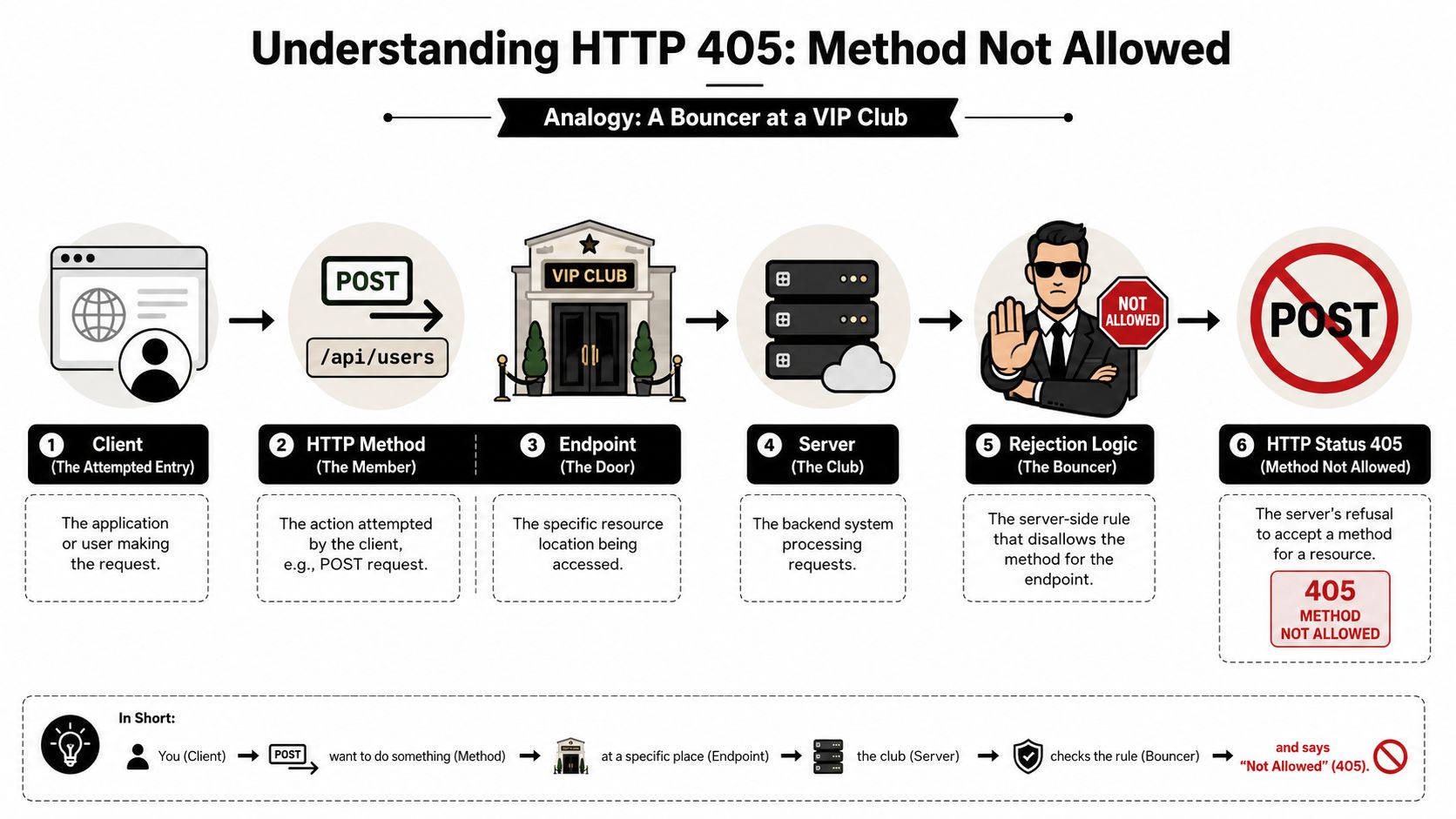
What 405 usually means
A few examples make this concrete:
GET /users/42works because the endpoint supports reading a userPOST /users/42fails because that same endpoint may not support creation at a specific resource URLDELETE /reports/dailyfails because the route exists but was intentionally made read-only
The important distinction is that 405 is not the same as several nearby errors developers confuse it with:
| Status | Meaning | Quick interpretation |
|---|---|---|
| 400 | Bad request syntax or invalid input | “I can't parse or accept this request shape.” |
| 401 | Missing or invalid authentication | “You aren't authenticated.” |
| 403 | Authenticated but not allowed | “I know who you are, but you can't do this.” |
| 404 | Resource not found | “That URL doesn't exist.” |
| 405 | Method not allowed | “That URL exists, but not with this method.” |
What a correct 405 response should tell you
A useful 405 response often includes an Allow header listing valid methods. If you tried POST and the response says Allow: GET, HEAD, the server is giving you a clue, not just an error.
A 405 says the door exists. Your method is what's being rejected.
That's why 405 is often easier to debug than a vague 500. The challenge isn't understanding the meaning. The challenge is identifying which layer decided the method was disallowed.
Common Causes of HTTP Status 405
Most tutorials stop at “you used the wrong method.” That's incomplete. In real systems, 405 errors come from several places, and the hidden ones waste the most time.
The biggest blind spot is middleware and gateway filtering. About 38% of 405 errors stem from middleware layers like Cloudflare, AWS API Gateway, or Kong filtering HTTP methods before reaching the origin server, adding on average 2.5 hours to debugging time, according to Postman's HTTP 405 guide. That's the part many teams miss.
Origin server causes
These are the obvious ones, and they do happen:
- Route only supports one verb: An Express handler registered with
app.get()will rejectPOSTunless you explicitly add it. - Framework defaults are narrower than expected: A Django view, Flask route, or controller action may allow fewer methods than the client assumes.
- Web server restrictions: Nginx
limit_except, Apache rules, or path-based restrictions can block methods before app logic runs.
These issues usually leave clues in app logs because the request reaches your stack.
Middleware and gateway causes
Debugging can prove difficult. A 405 may be injected by infrastructure that sits between the client and the app:
- API gateway method whitelists
- CDN or WAF rules
- Ingress or reverse proxy policies
- CORS preflight handling that mishandles
OPTIONS - Plugin or middleware packages that reject methods early
If your app logs show nothing for the failed request, don't celebrate. That often means the request never got that far.
If the origin has no trace of the request, treat the 405 as an edge-layer suspect first.
Pattern clues that help you narrow it down
Look for small signals:
| Clue | What it often suggests |
|---|---|
| No app log entry | Gateway, CDN, proxy, or WAF blocked it upstream |
Response includes Allow with methods you didn't define |
A different layer may be generating the response |
Browser fails on OPTIONS before the real request |
CORS or preflight handling issue |
| Works locally but fails in staging or production | Infrastructure policy difference |
| Only one path prefix fails | Path-based gateway or proxy rule |
A 405 is often less about coding and more about request ownership. The question is: who answered first?
Example HTTP Requests and Responses
Examples make 405 easier to spot because the response shape often hints at the layer that rejected the call.
Express route rejects POST
Suppose your app only defines a read route:
curl -i -X POST https://api.example.com/users/42
Possible response:
HTTP/1.1 405 Method Not Allowed
Allow: GET, HEAD
Content-Type: application/json

{
  "error": "Method Not Allowed",
  "message": "POST is not supported for this endpoint."
}
That usually points to app or framework routing. The route exists, but your code only registered GET.
Nginx or reverse proxy rejects DELETE
Now imagine the application supports DELETE, but the front server does not:
curl -i -X DELETE https://api.example.com/admin/reports
Possible response:
HTTP/1.1 405 Method Not Allowed
Server: nginx
Content-Type: text/html
Short, generic responses with a server signature and no app JSON often suggest the response came from the web server or proxy layer instead of your application.
API gateway rejects PUT before origin
This is the cloud-native trap. A route can be correct in code and still fail because the gateway policy for the path only permits selected methods.
curl -i -X PUT https://gateway.example.com/agents/123
  -H "Content-Type: application/json"
  -d '{"name":"Support Agent"}'
Possible response:
HTTP/1.1 405 Method Not Allowed
Content-Type: application/json

{
  "message": "Method not allowed"
}
If your backend logs stay empty, suspect the layer in front. When you're testing agent APIs or tool endpoints, it helps to compare direct origin behavior with gateway behavior. If you work with agent interfaces, reviewing a real API surface like the Hermes API reference can help you think clearly about method-by-endpoint design.
Read the response like a fingerprint
When you inspect a 405, focus on:
- Status line: confirms method rejection
- Allow header: shows expected verbs when present
- Server header or body style: hints at app vs proxy vs gateway
- Missing app telemetry: suggests the request died upstream
You don't need a perfect response body to debug a 405. You need enough context to identify the speaker.
Diagnostic Steps for HTTP Status 405
A 405 becomes manageable when you debug it in order. Random checks create noise. A layered checklist creates signal.
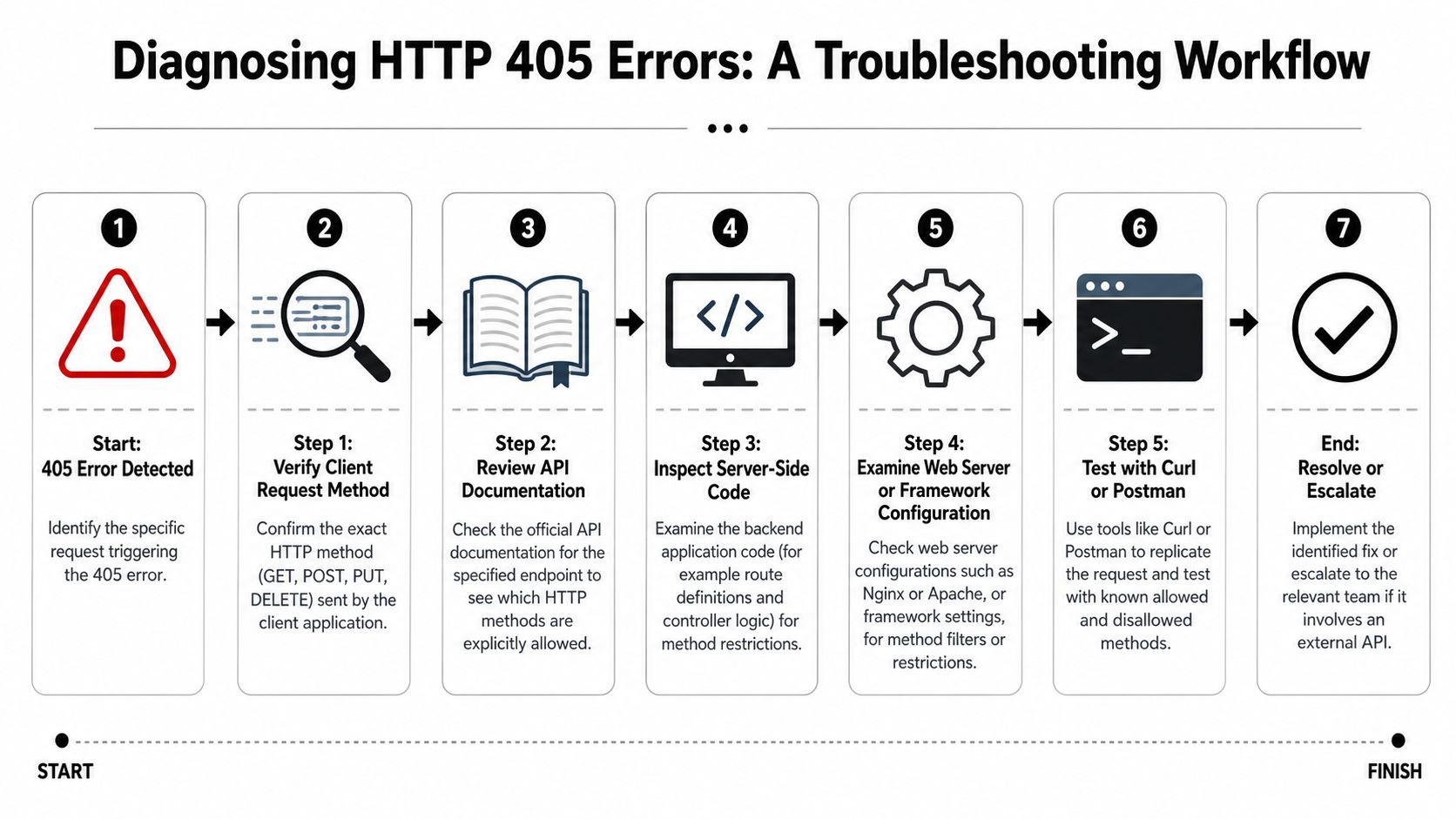
Start with the request you think you sent
First, verify the actual method on the wire. Browsers, SDKs, frontend wrappers, and form helpers sometimes send something different from what you expect.
Use curl or HTTPie to remove UI noise:
curl -i -X OPTIONS https://api.example.com/resource
Then compare that with:
curl -i -X POST https://api.example.com/resource
If you want a quick browser-based environment for clean reproduction, Digital ToolPad for privacy-first API testing is a practical option for checking methods, headers, and responses without debugging through your full app stack.
After that, confirm the endpoint contract. The issue may be as simple as posting to /users/123 when creation only belongs on /users.
Move outward from app to edge
Check the application first, then each layer in front of it:
- Route definition: Does the controller, handler, or decorator include the method you're sending?
- Framework middleware: Are method overrides, CSRF checks, or plugins rewriting behavior?
- Web server config: Look for path blocks, restricted methods, and proxy rules.
- Ingress and gateway policies: Review method whitelists, route mappings, and edge security filters.
- CDN or WAF rules: Some products block verbs by policy or path pattern.
This short video gives a useful visual walk-through of debugging flow:
Field note: When staging fails and local succeeds, compare infrastructure before changing code.
Reproduce the failure outside the app
Try the same request through different paths:
- Direct to origin: If possible, test the app endpoint without the gateway
- Through the public endpoint: Test the full production route
- With
OPTIONS: See whether the stack advertises allowed methods - With a known-good verb: If
GETworks andPUTfails, method filtering is more likely than path mismatch
Also inspect logs in the same sequence. Start with app logs. If they're empty, move to reverse proxy logs, ingress logs, and gateway logs. Don't infer. Follow the request trail.
Server Framework Specific Fixes for HTTP Status 405
Different stacks expose the same mistake in different ways. The fix is usually small once you find the right layer.
Configuration Snippets Comparison
| Platform | Sample Fix | Configuration Location |
|---|---|---|
| Nginx | Allow the required verb by adjusting path rules such as limit_except for the relevant location block |
nginx.conf or site config |
| Apache | Remove or update method restrictions in directory or rewrite rules | .htaccess or virtual host config |
| Express.js | Register the route with the required handlers, such as .get(), .post(), or app.route() |
Application route file |
| Django | Add the allowed HTTP methods to the view logic or class-based view handlers | View class or function |
| AWS API Gateway | Update the resource method mapping and deployment so the gateway accepts the intended verb | Gateway route and method settings |
What the fixes look like in practice
For Express.js, the usual problem is too narrow a route:
app.get('/users/:id', getUser);
If the endpoint should also support updates, define that explicitly:
app.route('/users/:id')
  .get(getUser)
  .put(updateUser);
For Django, a function-based or class-based view may only implement get() and omit post() or put(). In that case, the framework is doing the correct thing by returning 405.
For Nginx, check location blocks that restrict methods. If a path has a limit_except rule, the app can support PUT all day and still never receive it. The same logic applies to Apache when rewrite or access rules narrow allowed verbs for a directory or path.
For AWS API Gateway, developers often update backend code and forget to add the corresponding method at the gateway route. That mismatch is classic: code says yes, gateway says no.
One useful habit is to keep your endpoint contract and implementation side by side. If you work on agent systems with multiple APIs, reviewing another API surface such as the OpenClaw API can be a good reminder that method design belongs in both documentation and infrastructure, not only in app code.
Fix the narrowest layer that is wrong. Don't loosen every layer just to make the error disappear.
That matters for security. A missing PUT on one endpoint should not turn into a broad “allow all methods” change at the proxy.
Logging Monitoring and Security Best Practices
A fixed 405 is good. A traceable 405 is better. In production, you want enough context to answer three questions quickly: who sent the request, which layer rejected it, and whether the rejection was expected.
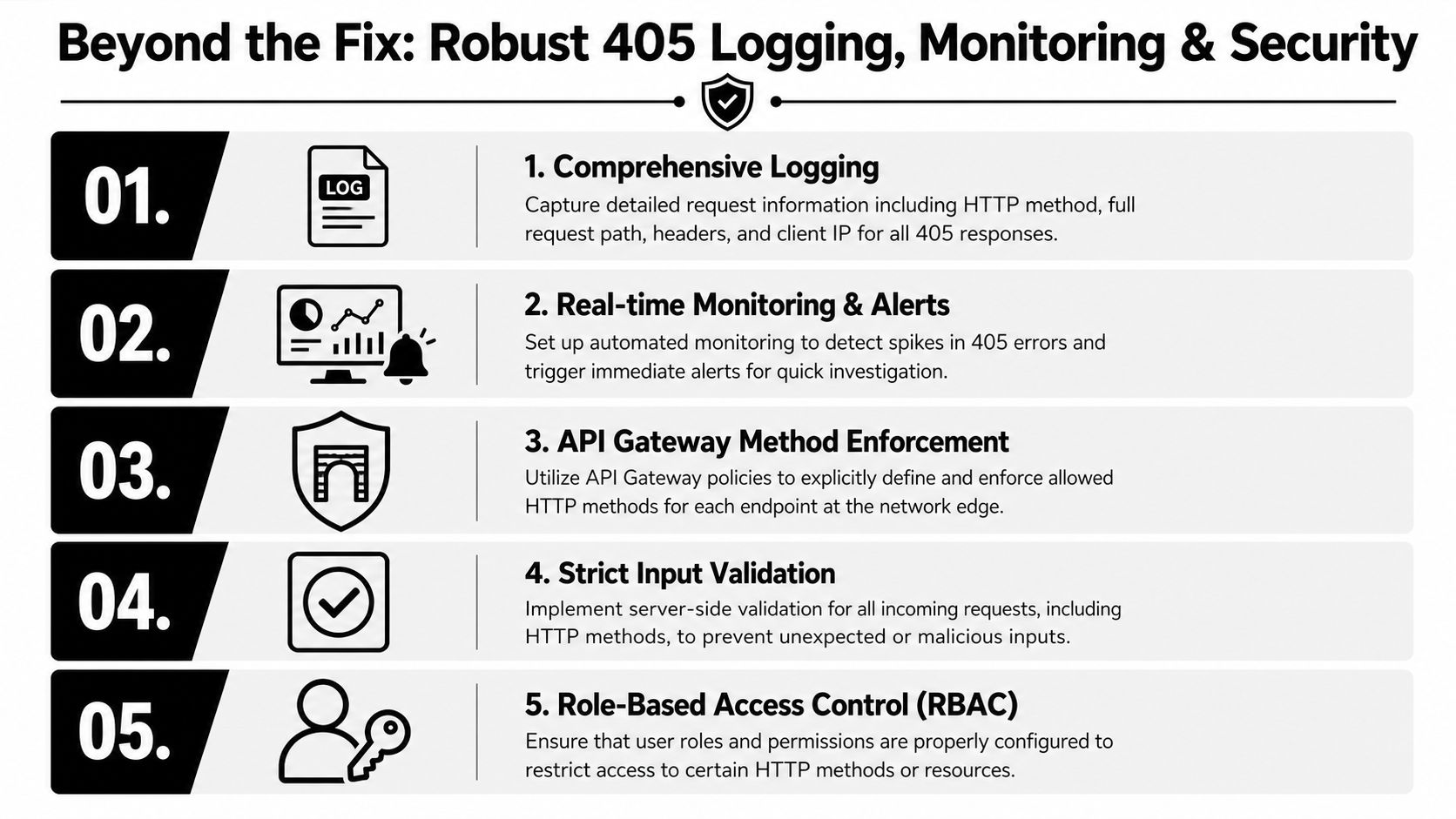
What to log when a 405 appears
Log the basics every time:
- Method and path: You need the exact verb and endpoint pair
- Relevant headers: Especially request IDs, origin hints, and content type
- Response layer: App, proxy, gateway, or CDN if you can tag it
- Correlation ID: So one failed request can be traced across systems
If your environment includes IIS anywhere in the chain, this guide to compliance through IIS logs is useful because it shows how logging quality affects traceability and audit readiness, not just troubleshooting.
How to make 405s safer in production
Don't think of 405 only as an error. It's also a policy boundary.
- Define methods explicitly: Every endpoint should have a deliberate method contract.
- Enforce at multiple layers: App and gateway rules should agree, not conflict.
- Watch for spikes: A sudden burst of 405s may indicate a broken client rollout, bad deployment, or probing activity.
- Audit rule changes: Method restrictions changed by gateway edits are easy to miss during incident review.
- Tie access to roles: Some method access belongs behind stronger controls. A good security policy reference shows how access boundaries and audit trails fit together.
A clean 405 is part of a secure API. A mysterious 405 is an operations problem.
The goal isn't to eliminate all 405s. It's to make legitimate ones intentional and illegitimate ones explainable.
Conclusion and Next Steps
HTTP Status 405 looks simple, but the fastest fix comes from thinking in layers. The route may reject the method. The framework may reject it earlier. Or the gateway, proxy, CDN, or middleware may inject the 405 before your app sees a byte.
That's why the reliable workflow is straightforward: verify the method, confirm the endpoint contract, inspect app routes, then move outward through server config, ingress, and edge policies. Read the response headers closely, and trust logs more than assumptions.
Teams that treat 405 as only a client mistake tend to lose time. Teams that trace ownership of the response usually solve it much faster and make their APIs safer in the process.
If you want one place to deploy, monitor, and govern AI agents without piecing together separate infrastructure layers, Donely gives you a unified dashboard for hosting, logs, isolated instances, RBAC, and audit-friendly operations so issues like hidden 405s are easier to track before they disrupt production.