
You've probably already built the prototype. One AI agent handles a support queue, another drafts outbound replies, a third updates CRM notes, and suddenly the “temporary” server you spun up is carrying real business traffic. That's usually the moment people start searching for how to build a server and realize most guides stop at assembling hardware, installing Ubuntu, and calling it done.
That approach breaks fast when AI agents move from a single-user experiment to a multi-workload system. The problem isn't just compute. It's isolation, access boundaries, logging, recovery, and making sure one client's agent can't interfere with another client's data or runtime. If you're deploying OpenClaw-style agents for your own team, for customers, or across several internal functions, you need a production mindset from the first build.
Table of Contents
- Beyond the Basics Building a Server for AI Agents
- Laying the Foundation Hosting and Hardware Choices
- OS Provisioning and Runtime Environment Setup
- Containerization and Secure Workload Isolation
- Hardening Your Server Security RBAC and Backups
- The Path to Production Monitoring CI/CD and Scaling
Beyond the Basics Building a Server for AI Agents
Why standard server tutorials fall short
Most server guides still assume a simple workload. One application. One team. One admin user. That model doesn't map well to AI agents, especially once you run separate automations for sales, support, operations, or multiple client accounts.
A documented gap in existing “how to build your own server” content is that it focuses on hardware assembly and OS installation while missing secure, scalable multi-workload isolation for AI agents. One industry analysis says over 68% of enterprise AI deployments now run multi-agent systems, yet fewer than 12% of beginner server guides address per-instance RBAC, isolated containers, or scoped data access (iSHosting analysis).
That gap matters because AI workloads fail in ways normal tutorials don't address. An agent can write to the wrong datastore. A plugin can pull in conflicting dependencies. A support bot can exhaust memory and starve another workload. The machine may still be “up,” but the platform is already broken.
Practical rule: If two agents shouldn't share data, logs, credentials, or package dependencies, they shouldn't share the same runtime boundary.
What changes when AI agents become production workloads
A real server for AI agents needs more than CPU and RAM. It needs isolation at the application layer, predictable deployment paths, and controls around who can access each workload. That's why terms like containerization and RBAC stop being enterprise jargon and become day-one requirements.
In practice, the architecture changes in a few ways:
- Separate workloads by boundary: Run each agent in its own container or isolated service unit.
- Scope access deliberately: Developers, operators, and client users shouldn't all have the same permissions.
- Treat logs as part of the product: You'll need to trace prompts, actions, failures, and service health.
- Plan for duplication: If one agent pattern works, you'll want to clone it safely for another client or use case.
That's also why the market has started valuing engineers who can bridge infra and AI operations. If you want a sense of how these responsibilities show up in practice, browsing DevOps Engineer jobs for AI platforms is useful. The recurring theme isn't just “run servers.” It's run secure platforms that can support many AI workloads at once.
Laying the Foundation Hosting and Hardware Choices
A lot of server builds fail before the OS installer ever starts. The problem is usually a bad hosting decision, not a bad Linux decision. Teams pick hardware around peak benchmark numbers, then discover three months later that they needed predictable storage, clean tenancy between agent workloads, and a way to recover quickly when one deployment goes sideways.
Cloud versus self-hosted for agent infrastructure
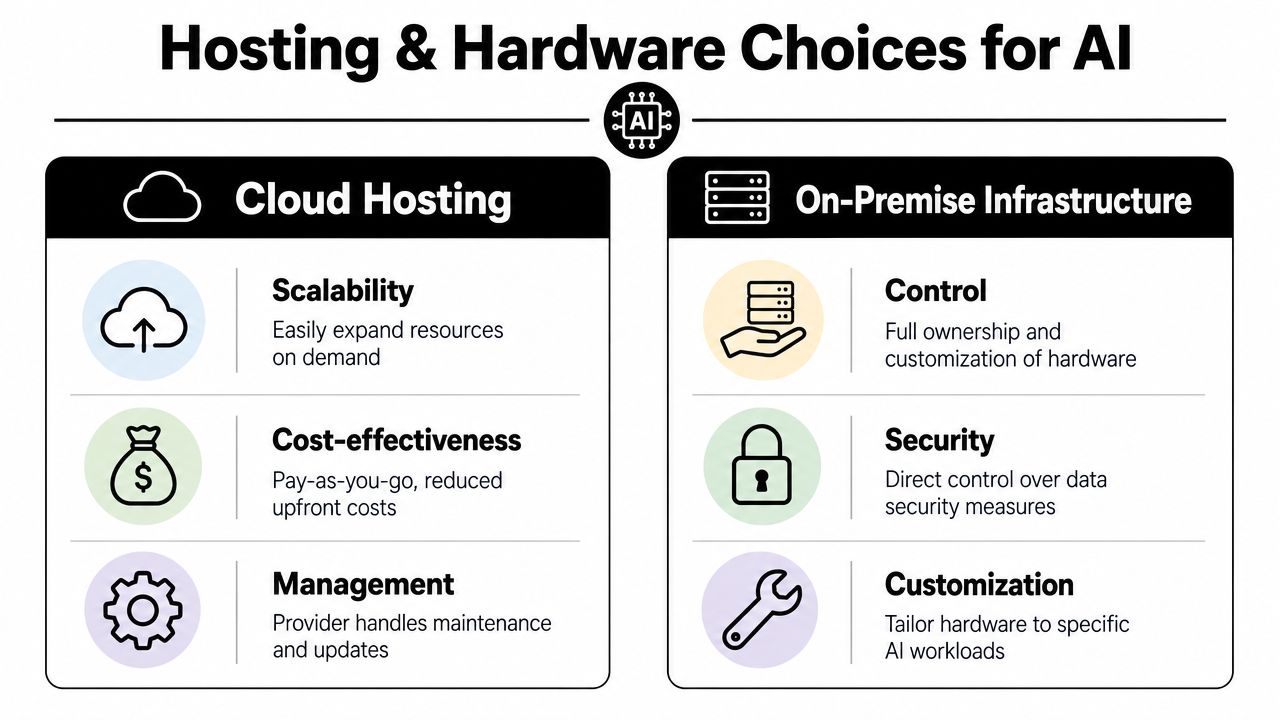
For AI agents, hosting choice sets the operational model. It affects how fast you can provision new environments, how you isolate customer workloads, how you handle incident response, and who gets paged when hardware fails.
Cloud VMs are usually the right starting point for teams still validating workloads or supporting multiple client environments. You can spin up capacity quickly, test separate agent stacks without waiting on procurement, and replace failed instances faster than you can troubleshoot a dead motherboard. That matters for platforms like OpenClaw, where one server often turns into several isolated workloads with different access rules and data paths.
Dedicated servers and on-premise clusters still have a place. They make sense when data locality, hardware control, fixed long-run capacity, or specific compliance constraints outweigh the convenience of managed infrastructure. The trade-off is simple. You get more control, and you inherit more failure modes.
| Option | Best fit | Main advantage | Main downside |
|---|---|---|---|
| Cloud VM | Teams deploying and iterating quickly | Fast provisioning and easier replacement | Instance sprawl if governance is weak |
| Dedicated server | Predictable, steady workloads | Full control over hardware and host configuration | You own hardware lifecycle, spare capacity, and recovery |
| On-premise cluster | Strict compliance or facility-level requirements | Physical control and custom network design | Highest setup, maintenance, and staffing burden |
If you're evaluating physical infrastructure beyond a single host, this resource for data center projects is a useful companion read.
Teams planning OpenClaw often underestimate how much time disappears into host maintenance, patching, storage tuning, and tenancy design. Comparing that with a managed option is worth doing early. OpenClaw hosting options for production AI workloads make that trade-off easier to assess.
The hardware baseline that actually matters
For secure multi-workload agent systems, the useful baseline is not "what can boot Linux." It is "what can run several isolated services, keep state on fast disks, and survive growth without turning every deployment into a capacity fight."
DirectMacro notes that production server builds commonly start around 32GB of RAM with multi-core server-class CPUs, and that virtualization support matters if you plan to run multiple isolated environments on one machine, as outlined in DirectMacro's server build guidance. That aligns with what shows up in practice. Memory pressure and storage latency usually hurt earlier than raw CPU limits for agent workloads that queue jobs, process files, cache models, and write logs continuously.
For lighter web-serving roles, lower specs can work. For AI agents, treat entry-level hardware as a temporary lab setup, not a production target.
A practical starting point looks like this:
- Multi-core CPU with hardware virtualization support
- Enough RAM headroom to run the host, containers, background jobs, and burst traffic without swapping
- SSD or NVMe storage, especially if agents read documents, keep task state, or write frequent logs
- Separate capacity planning for compute workloads versus persistent data
- Room to add another isolated workload without rebuilding the host
GPU planning is a separate decision. Many agent platforms do not need a local GPU at all if inference runs through external APIs. Buying GPU hardware too early is a common mistake. It raises cost, power, and thermal requirements before you know whether the workload benefits from local inference.
What works and what usually backfires
What works is disciplined sizing. Start with enough memory, fast storage, and a hosting model your team can operate at 2 a.m. after a failed deploy. Keep capacity in reserve for the second and third agent workload, not just the first demo.
What backfires is building for the wrong bottleneck. I see teams overspend on CPU, then run every service on one host filesystem with no plan for noisy neighbors, recovery, or future tenant separation. Others choose the cheapest VM possible, then discover that one indexing job can stall every other agent on the box.
The better rule is to optimize for isolation, recovery, and predictable operations from day one. Hardware matters. Hosting decisions matter more.
OS Provisioning and Runtime Environment Setup
A server install goes wrong when people optimize for getting through the installer quickly. Production provisioning should optimize for the changes you know are coming. More logs, more data, more agent instances, more services.
Install for change not for today
Ubuntu Server LTS remains a practical default because package support is broad, operational patterns are familiar, and most automation examples assume it. During installation, the partitioning choice matters more than many beginners realize.
If you're building on Ubuntu, selecting “Guided – use entire disk and set up LVM” is the critical option because it enables flexible volume management and future storage expansion without data migration, as noted in this Ubuntu dedicated server walkthrough. LVM also lets you resize logical volumes and create snapshots for backups, which is exactly what you want once logs and persistent agent data start growing.
The other easy mistake is networking. If you leave the server on a changing address assignment model, you're inviting random service interruptions later. The same guide points out that failing to configure a static IP address right after OS installation is a common pitfall.
The base runtime stack
Once the OS is in place, keep the host lean. The host should run the minimum needed to manage containers, updates, networking, and observability. Don't treat the base OS like your application box.
I'd keep the runtime stack split like this:
- Host layer: SSH, firewall, container engine, time sync, log forwarding, monitoring agents.
- Language layer: Python virtual environments only for local build tasks if needed, not for long-term mixed production services.
- Application layer: Agent runtimes inside containers, with pinned dependencies and explicit environment variables.
- Data layer: Separate directories or mounted volumes for logs, models, cache, and persistent state.
If your target workload includes a Hermes-style orchestration pattern, it's worth reviewing how an opinionated agent runtime is packaged and deployed in Hermes agent hosting. Not because you should copy a vendor stack exactly, but because it shows how much complexity sits above the OS layer.
Don't install application dependencies directly onto the host unless you're comfortable rebuilding the host every time those dependencies drift.
A practical provisioning checklist
A clean provisioning pass usually includes these tasks before any agent code lands on the machine:
- Update the base system: Apply package updates immediately and verify the kernel, storage, and network stack are in a known-good state.
- Create admin access correctly: Use named accounts, SSH access, and least-privilege sudo rather than shared root habits.
- Set host identity early: Hostname, time zone, NTP, and static addressing should be stable before certificates and monitoring get layered on.
- Prepare storage paths: Separate locations for container volumes, logs, backups, and temporary files so growth in one area doesn't choke another.
- Install the runtime you'll standardize on: Docker or another container engine first. Everything else should assume that packaging model.
That order saves rework later. It also gives you a host that can survive the normal evolution from “one agent on one server” to “several isolated runtimes with different update cadences.”
Containerization and Secure Workload Isolation
A multi-agent server without containers becomes a permissions and dependency puzzle almost immediately. You can get away with a shared Python environment during development. You can't do that for long in production.
Why containers are the real boundary
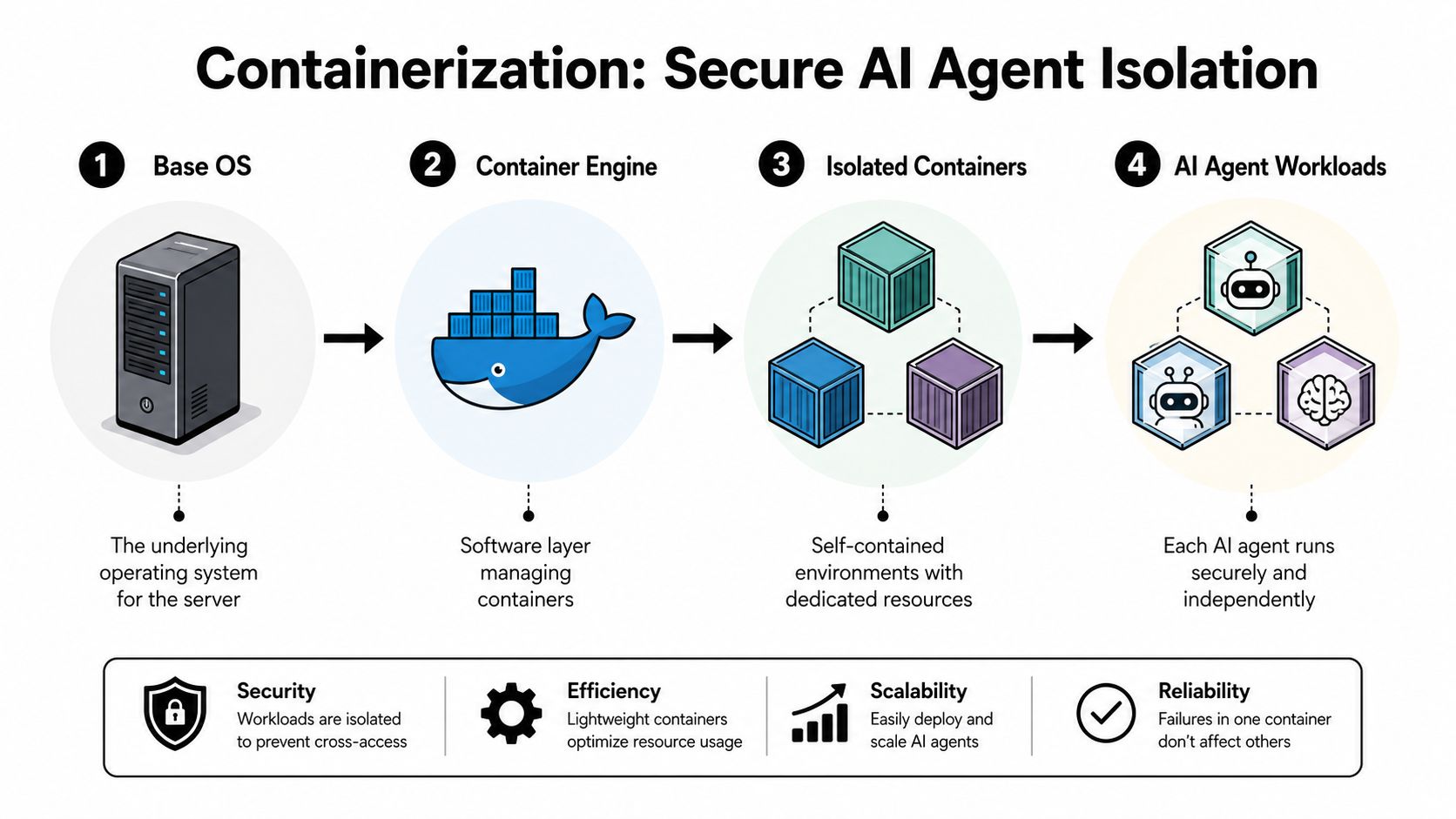
Containers solve the practical problem that most “how to build a server” tutorials ignore. They let each agent run with its own dependencies, environment variables, and mounted storage without contaminating the rest of the machine.
For AI agents, that matters in several ways:
- Dependency isolation: One agent may need a different Python package tree, Node version, or system library than another.
- Failure containment: A runaway process, bad release, or memory-heavy task is easier to identify and replace.
- Repeatable deployment: The same image can move from local testing to production with fewer surprises.
- Client separation: Distinct containers make it easier to attach separate credentials, storage, and access rules.
A server can host several agents safely only if each workload has a clear boundary. Containers are the lowest-friction way to get there.
A simple Docker pattern for AI agents
You don't need an elaborate image to start. You need a predictable one. A basic Dockerfile for an AI agent usually does four things: chooses a stable base image, installs only required system packages, copies locked dependency files first for better caching, and runs as a non-root user.
A practical pattern looks like this, conceptually:
- Start from a slim language runtime image.
- Install only the OS packages your agent needs.
- Copy dependency manifests first, then install dependencies.
- Copy the app code after that.
- Switch to a non-root user.
- Expose only the application port you intend to serve.
- Define one clear startup command.
The value isn't elegance. It's reproducibility. When an agent fails, you want to know whether the problem is the code, the config, or the environment. Containers make those lines much clearer.
Put secrets in runtime configuration, not in images. If credentials are baked into the container, you don't have deployment artifacts. You have long-lived liabilities.
Storage deserves the same discipline. Don't let every container write anywhere it wants. Mount only the directories the workload needs. Keep transient cache separate from persistent state. If an agent needs files for one client, that mount should belong only to that instance.
When Kubernetes starts to make sense
Kubernetes is useful when the operational pain of many containers becomes worse than the complexity of orchestration. You'll know you're getting there when you need standardized rollouts, service discovery, self-healing behavior, policy enforcement, and repeatable scaling across many workloads.
For a solo builder or a small team, plain Docker with Compose can carry you surprisingly far if the architecture is disciplined. One host. Separate services. Explicit volumes. Reverse proxy. Real monitoring. Clean backups.
Kubernetes helps when you have patterns that need to repeat across many agent instances, especially if deployments are frequent and environments multiply. What doesn't work is adopting Kubernetes to compensate for poor workload boundaries. If the containers are messy, the cluster just gives you a larger messy system.
Hardening Your Server Security RBAC and Backups
A production AI agent server fails differently from a basic web server. You are not protecting one app and one database. You are protecting multiple workloads, separate client data, model credentials, API keys, internal queues, and operators with different levels of access. If those boundaries are vague, one bad deploy or one stolen credential can spill across the whole host.
Start with access control, because everything else depends on it. Use SSH keys. Disable direct root login. Put every human operator on an individual account. Keep sudo rights tight and audited. A firewall should default to deny, then allow only the ports you have a clear reason to expose. That usually means SSH for administration and HTTP or HTTPS through a reverse proxy. If an AI workload needs a private admin interface, bind it internally and put authentication in front of it instead of publishing another public port.
Patching needs the same discipline. Servers drift fast, especially when AI teams are testing new runtimes, agents, and model connectors every week. Set a patch window, apply security updates on schedule, and reboot deliberately when the kernel or container runtime requires it. The trade-off is real. Aggressive patching lowers exposure, but careless patching can break CUDA drivers, Python dependencies, or inference libraries. Test changes on a staging host first if the server runs revenue-bearing workloads.
RBAC starts below the application layer
A lot of tutorials treat RBAC as something you add in the product UI. That is incomplete. For multi-workload AI agents, RBAC has to exist at the host, container, secret, and deployment layers too. If every operator can shell into every container, read every environment variable, and mount every volume, the role model in the app is mostly cosmetic.
I usually split server-side permissions like this:
| Role | What they should do | What they should not do |
|---|---|---|
| Platform admin | Manage hosts, networking, certificates, backups, and deployment policy | Read tenant data by default |
| Agent operator | Deploy assigned services, inspect logs, restart workloads, rotate scoped secrets | Change host security settings or access unrelated workloads |
| Client or business owner | View outputs, trigger approved actions, manage their own scoped settings | Reach other tenants, containers, or infrastructure internals |
That separation matters more on platforms like OpenClaw, where one server may run several agents with different trust levels and data sensitivity. The host has to enforce isolation, not just suggest it.
Published policies help teams turn that into something repeatable. A documented security policy for AI infrastructure controls is a useful reference point when you need to define who can access hosts, secrets, logs, and customer data.
The operational side matters too. Teams often discover they need different people for host security, deployment systems, and tenant-facing platform controls. That is one reason hiring for DevOps and platform roles becomes a real design decision, not just an org chart detail.
Backups have to match how AI workloads actually fail
File copy jobs are not enough. For AI agents, the recovery set usually includes databases, vector stores, uploaded documents, job queues, audit logs, prompt and tool configuration, and any persistent state mounted into containers. Source-controlled manifests help, but they do not recover runtime data.
Back up only what you cannot recreate, and classify it by recovery priority. Client data and system state come first. Cached model artifacts and temporary work directories usually do not belong in the same backup plan. Off-host storage is required. Immutable snapshots are better. Encryption at rest and in transit should be standard, especially if the server processes client documents or regulated data.
Restore tests are where weak plans show up.
A backup is credible only after you restore it to a clean machine, rebuild the services, and verify that permissions, secrets, and network rules still line up. I have seen teams recover the database but miss the reverse proxy config, lose the secret material needed to start workers, or restore volumes with the wrong ownership so the application comes up broken. Write the recovery steps down. Time them. Fix the slow parts before an incident forces the issue.
For a single-host setup, a practical baseline is simple. Automated backups on a schedule, off-site retention, versioned infrastructure config, and a restore drill that proves you can rebuild the server without guesswork. That is the line between a lab environment and a production platform for secure, multi-tenant AI agents.
The Path to Production Monitoring CI/CD and Scaling
Production trouble usually starts after the server looks finished.
The host is up, containers are isolated, access controls are in place, and the first real workloads begin to hit the box. Then the operational failures show up. Queues stall. Workers restart in loops. One client's heavy document run starves another tenant's agent. A model gateway starts timing out, but only under load. Basic server tutorials rarely cover this part, and it is the part that decides whether an AI agent platform is usable in production.
Monitor the failure modes that matter
Monitoring needs to cover more than host uptime. A production server for AI agents has multiple failure planes: the machine, the containers, and the agent workflows themselves. As noted in this monitoring implementation guide, a small set of core infrastructure checks catches a large share of common failures, and alerts work better when they are split into critical, warning, and informational levels with a short sustain period to filter out noise.
That baseline is useful, but AI workloads need one layer deeper visibility.
I monitor three categories separately:
- Host health: CPU saturation, memory pressure, disk usage, network errors, filesystem latency.
- Container health: restart count, OOM kills, image drift, exit codes, per-container resource consumption.
- Application health: queue depth, failed jobs, external API latency, token or model provider errors, per-tenant workload contention, and end-to-end task completion.
For OpenClaw or a similar multi-workload setup, application monitoring usually exposes the actual issue first. The host can look healthy while one customer's ingestion pipeline backs up, a vector indexing worker falls behind, or a document-processing container burns through its memory limit and gets killed repeatedly. If users report that before your alerts do, the monitoring stack is incomplete.
Logs help with diagnosis. Metrics tell you when to look. Traces help when one request crosses multiple services. In practice, teams need all three once agents start chaining models, tools, queues, and storage services together.
CI/CD should reduce variance, not add ceremony
A release path for AI infrastructure needs to be boring. Predictable builds, repeatable deploys, clear approvals, and rollback that works under pressure matter more than a complex pipeline diagram.
A practical pipeline usually does five things: lint and test the code, build the container image, tag the release, push it to a registry, and deploy with the exact same manifest every time. GitHub Actions is enough for many teams. The hard part is not writing the YAML. The hard part is deciding what gets promoted, who can approve production, how secrets are injected, and how you confirm the right image reached the right environment.
Manual SSH deploys break down fast in multi-tenant AI systems. One engineer updates the API container but forgets the worker image. Another restarts the wrong stack on the wrong host. Someone hotfixes production and never commits the change. That is why platform work and operations work increasingly overlap here. If you are building the team around that reality, this piece on hiring for DevOps and platform roles is useful context.
Every deployment path should answer these questions without guesswork:
- What artifact is being deployed
- Which environment receives it
- Who approved the release
- What configuration changed with it
- How rollback works
- Where health checks, logs, and post-deploy status are verified
For AI agents, add one more check. Confirm that model credentials, tool permissions, and tenant-scoped RBAC still behave correctly after release. A deploy that passes health checks but widens access between workloads is still a bad deploy.
Scaling exposes platform gaps
Scaling an AI server is rarely blocked by raw compute alone. The primary cost shows up in operational sprawl. Each new agent or tenant adds more secrets, more containers, more policy boundaries, more logs, more routing rules, and more state to observe. Isolation that felt manageable on one host becomes harder to enforce. Noisy-neighbor problems get harder to diagnose. RBAC gets more granular. Monitoring and incident response take longer because there are more moving parts.
That is the gap many build-a-server guides miss. Getting one machine online is straightforward. Running secure, isolated, observable AI workloads for multiple teams or customers is platform engineering.
Some teams want that control and are willing to own the pager, the deployment system, the monitoring stack, and the scaling plan. Many teams really want reliable AI employees in production. Those teams usually reach the point where a managed platform is the cheaper operational choice, even if the first server was built in-house.
Donely gives you a faster path if you want production-ready AI agent infrastructure without owning all of that DevOps overhead yourself. You can host, deploy, and manage AI employees from one dashboard, keep workloads isolated, apply per-instance RBAC, and avoid rebuilding the same server platform every time a new agent or client comes online. Explore Donely if you'd rather spend your time on agent outcomes than on maintaining the stack underneath them.