
Your API is healthy in the morning, then a launch, a retry storm, or an over-enthusiastic automation script starts hammering the same endpoint. The dashboard turns noisy, latency creeps up, and teams begin asking the same question, how do we slow this down without blocking the traffic that is important?
Rate limiting is the control that answers that question. It sets a ceiling on requests over a defined time window, and when traffic exceeds the limit, the system can reject it with HTTP 429 Too Many Requests. That basic idea now sits inside edge security, API gateways, reverse proxies, and distributed control planes, because modern systems need protection from both abuse and accidental overload, not just more hardware.
Table of Contents
- Why Rate Limiting Matters
- Understanding Rate Limiting Algorithms
- Designing Scalable Rate Limiting
- Handling Bursts and Quota Policies
- Monitoring Rate Limits and Alerts
- Implementing Rate Limiting Techniques
- Testing and Migrating Rate Limits
- Next Steps for Robust Rate Limiting
Why Rate Limiting Matters
A payment API can look fine for months, then one partner integration misbehaves and sends a flood of retries. Without a limiter, the backend doesn't get to choose between good and bad traffic, it just gets overloaded. That's when harmless-looking requests start causing failed transactions, slow responses, and downstream services that begin to wobble.
Rate limiting works because it translates infrastructure capacity into a rule the system can enforce. Azion describes the standard pattern as tracking request counts per client over a time window and rejecting excess traffic, and Microsoft's .NET guidance uses a backend that can safely handle 1,000 requests per minute as the kind of capacity limit teams turn into policy (Azion's rate limiting overview). Cloudflare also frames rate limiting rules as a first-class defense against brute-force login attacks and as a way to cap how many API calls a single client can make in a window (Cloudflare WAF rate limiting rules).
That's why rate limiting isn't only about security. It also protects product reliability, keeps noisy neighbors from crowding out other users, and gives operators a way to preserve service quality under pressure. A well-tuned policy can be the difference between a brief spike and a broad outage.
Practical rule: if you can describe a backend's safe capacity in plain language, you can usually express it as a rate limit.
Teams also need rate limits to fit governance and security policy. If you're deciding how those controls sit alongside broader access rules, Donely's security policy page is a useful reference point for understanding how platform-level guardrails are presented in a managed environment.
Understanding Rate Limiting Algorithms
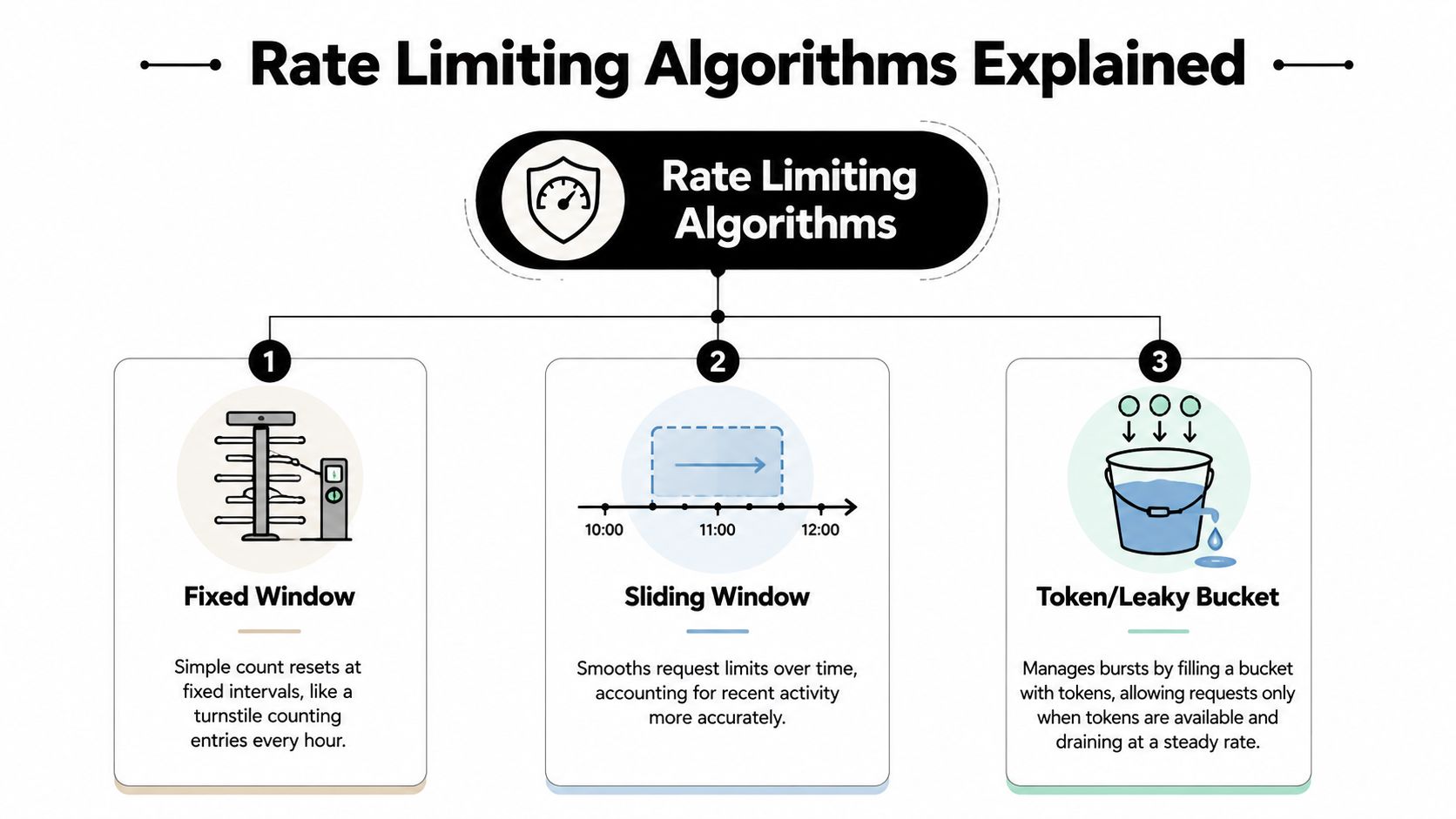
The algorithm matters because “limit requests” can mean very different things under the hood. Two systems can enforce the same quota and still behave differently when traffic arrives in bursts, because one resets on a clock boundary while another remembers recent history.
Fixed Window
A fixed window is the simplest model. Think of a turnstile that resets every hour, it counts entries until the hour flips, then starts over at zero. That simplicity makes it easy to understand and cheap to run, but it can also create edge effects when traffic piles up near a reset boundary.
The historical shape of rate limiting in production systems reflects this shift from broad policy to precise enforcement. NGINX documents a default-style example of 10 requests per second at millisecond granularity, which is the same as 1 request every 100 ms, showing how modern implementations can express limits very precisely (Cloudflare rate limiting rules). That's much more exact than older “just slow it down” thinking.
Sliding Window
A sliding window looks back over the most recent interval instead of a hard reset point. It smooths the boundary problem because recent traffic still counts, even if the clock just rolled over. For teams that care about fairness, it often feels more intuitive than a fixed window because a user who sent a burst a moment ago doesn't get a clean slate just because the minute changed.
The trade-off is extra bookkeeping. You're tracking recent activity more continuously, which usually means more state or more computation than a blunt counter.
Sliding windows are usually better when traffic is lumpy and you don't want one lucky timestamp to let through a burst that should have been throttled.
Token Bucket and Leaky Bucket
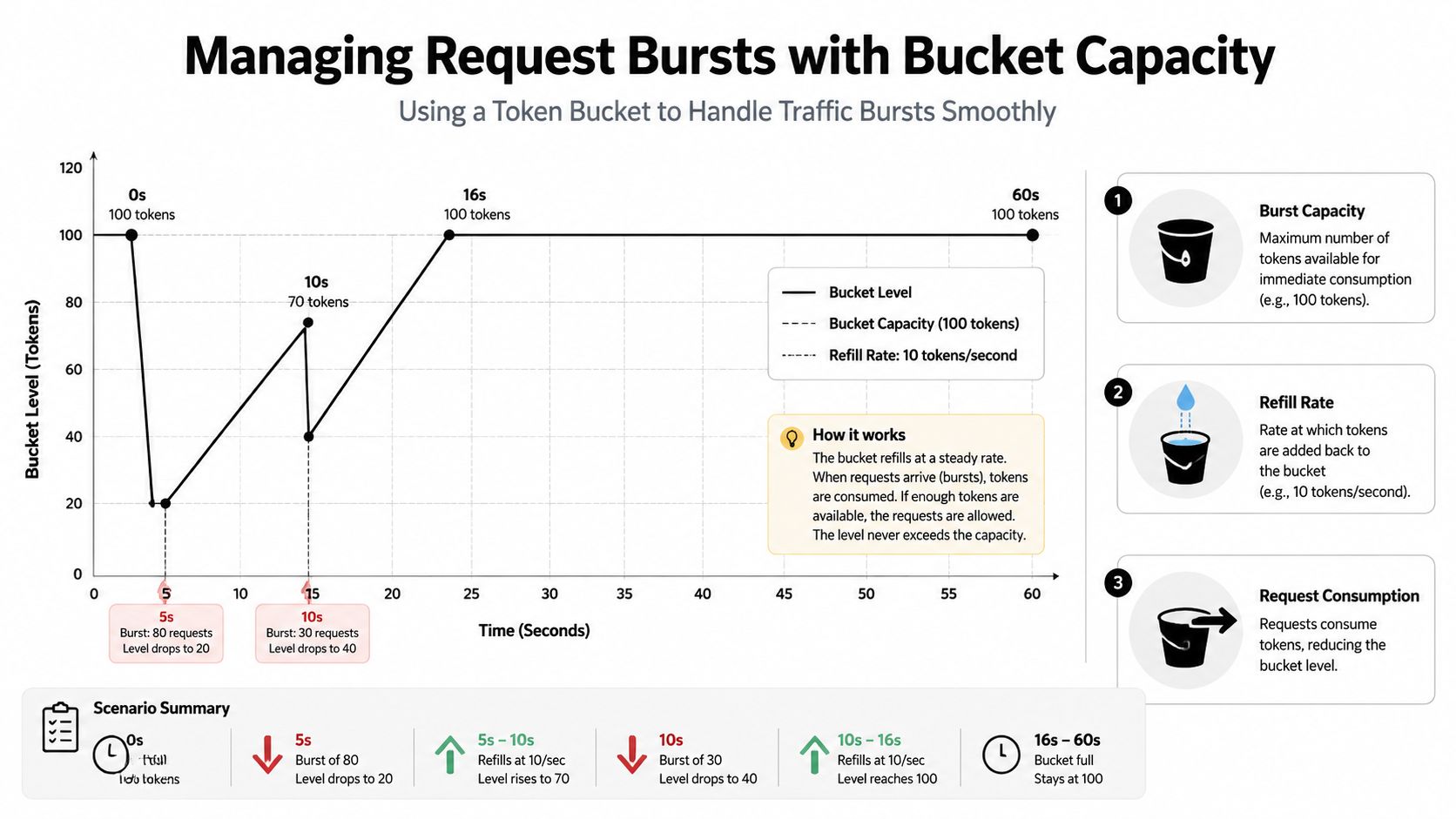
The token bucket and leaky bucket models are the most useful mental models for burst control. In a token bucket, tokens accumulate at a refill rate, and each request spends one token. If the bucket is full, you can absorb a burst. If it's empty, requests wait or fail.
A leaky bucket uses a steady outflow model, which makes it feel like water draining from a container at a constant pace. In practice, teams often choose token bucket when they want legitimate bursts to pass, because the bucket “remembers” unused capacity instead of forgetting it at each time boundary.
The big question isn't which one is “best.” It's whether you want strict simplicity, smoother fairness, or burst tolerance. For most modern APIs, the answer depends on how spiky the traffic is and how expensive each request becomes once it reaches the backend.
Designing Scalable Rate Limiting
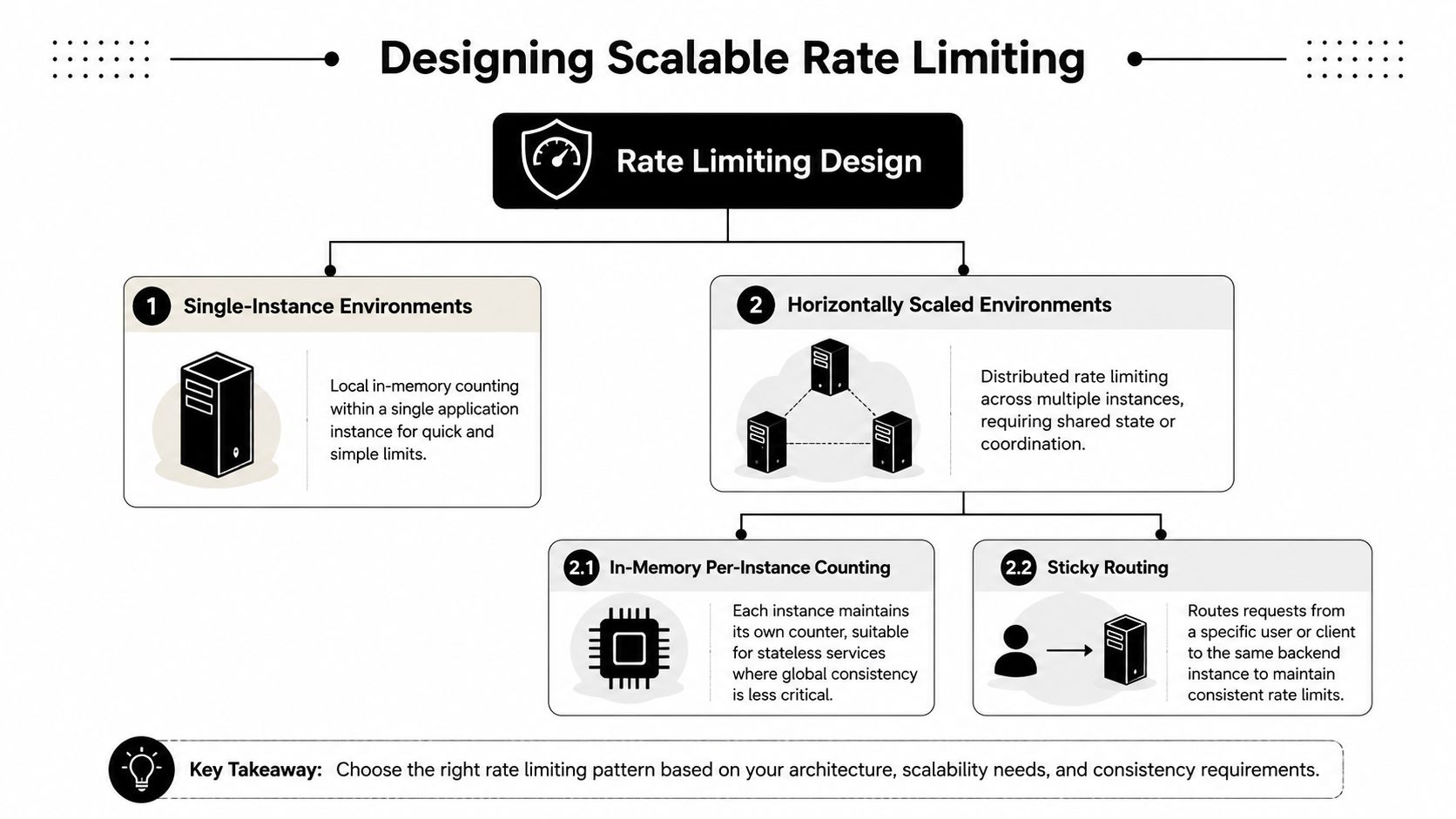
A limiter that works on one server can fail badly once traffic spreads across many instances. Local counters are fast, but they only know what happens on the box they live on. In a cluster, that can let clients bypass limits by bouncing requests around or by naturally hitting multiple hosts.
Single Instance and Local State
On a single application instance, in-memory counting is straightforward. The process tracks the client identifier, increments a counter, and decides locally whether to allow the call. That approach is simple, fast, and easy to debug because all the state lives next to the code handling the request.
It also fits cases where global consistency isn't critical. If one instance owns the traffic path, local state is enough.
Horizontally Scaled Systems
Once the service scales out, fairness gets harder. Technori's practitioner guidance points out practical trade-offs that get glossed over in basic advice; local in-memory limiters can be bypassed unless you introduce shared state, sticky routing, or a distributed limiter, but those choices add latency and global coordination cost (Technori's scalable API rate limiting strategies). This is the fundamental design tension, not just “use Redis.”
A useful way to think about the decision is to compare where the truth lives:
| Option | Best Use Case | Complexity | Latency Impact |
|---|---|---|---|
| In-memory per-instance counting | Single node or soft enforcement | Low | Low |
| Sticky routing | Repeated traffic from the same client | Medium | Medium |
| Shared distributed state | Stronger cross-node fairness | High | Medium to High |
| Edge enforcement | Block obvious abuse before app logic | Medium | Low to Medium |
The same source also recommends starting with edge enforcement and only adding distributed limiting where bypass causes harm (Technori). That advice matters because distributed control is never free.
For custom architectures, the limiter often sits alongside platform-specific routing and quota logic. A reference like custom OTC trading platform development can be helpful when you're thinking about how isolated workflows and policy boundaries get enforced in systems that carry sensitive traffic.
Handling Bursts and Quota Policies
Burst handling is where many teams discover whether their limiter is protective or just punitive. A rigid ceiling can block legitimate traffic that arrives in short spikes, while a permissive policy can leave the backend exposed to overload. The best systems separate burst capacity from the longer-term quota so they can absorb sudden demand without relaxing control forever.
Static Thresholds Break Down on AI Workloads
Static thresholds assume traffic behaves in a steady, predictable way. AI and automation traffic often doesn't. Recent 2026 guidance recommends dynamic rate limiting based on server load, response times, and real usage patterns rather than fixed thresholds, because bursty automation and AI requests can be expensive and uneven by design (Levo AI's 2026 API rate limiting guide).
That shift changes the policy question. Instead of asking only “How many requests per minute are allowed?”, teams also ask “How costly is this endpoint right now?” and “Is the backend already stressed?”
Quotas Need to Move With Load
A smarter policy can change limit behavior based on health signals, not just request counts. If response times rise or the server is already close to saturation, the limiter can tighten. If the system is quiet, it can allow more breathing room. That kind of adaptation keeps quotas fairer for legitimate users because the policy reacts to actual conditions instead of guessing from a fixed rule.
Useful framing: static quotas protect averages, dynamic quotas protect the service when reality gets weird.
For teams building AI-first products, that distinction is essential. Agent traffic, retries, and background automation tend to arrive in uneven patterns, so a quota system that can flex with demand usually feels less arbitrary to users and less dangerous to operators.
Donely's OpenClaw hosting is a relevant example of how managed platforms present isolated, multi-instance workloads when teams need boundaries between environments, clients, or automations.
Monitoring Rate Limits and Alerts
A limiter without monitoring becomes guesswork the first time a user complains. You need to know whether the system is blocking too much, not enough, or exactly what it should. The useful signals are usually simple: request counts, rejection counts, HTTP 429 rates, latency trends, and how fast tokens or credits are being consumed.
What to Put on the Dashboard
The first chart should show traffic by route or client. The second should show rejections over time, especially 429s, because a rising rejection pattern can mean either a real abuse attempt or a policy that's too aggressive. A third chart should track latency, since rate limiting often changes traffic shape before it changes volume.
That last point matters. A service can look “healthy” on raw request volume while users are already feeling the impact in response times.
How to Alert Without Creating Noise
Alerts should focus on change, not just absolute volume. A sudden rise in rejections deserves attention, but so does a steady stream of 429s on a route that normally stays quiet. Teams should also watch for missing metrics, because a broken limiter can fail unnoticed if telemetry isn't wired correctly.
A practical incident response loop is usually short:
- Confirm the source: check whether the rejections are clustered around one client, one route, or one tenant.
- Check service health: compare rejection spikes with backend latency and saturation.
- Review policy shape: verify whether the current thresholds still match business priority.
- Adjust carefully: loosen or tighten limits in small steps, then watch the next traffic window.
The goal isn't just to catch attacks. It's to detect over-enforcement before the limiter becomes the outage.
Implementing Rate Limiting Techniques

Implementation choices usually fall into five buckets, and each one shifts the balance between control, speed, and operational burden. The closer the limiter sits to the request path, the faster it can react. The farther away it sits, the easier it may be to manage globally.
Common Enforcement Paths
A few patterns show up again and again:
- Application middleware: Good when you want rules close to business logic and the team already owns the code path.
- API gateway rules: Useful when many services need the same front door policy.
- Reverse proxies like NGINX: Strong fit for edge control and straightforward per-client limits.
- CDN or edge workers: Helpful when you want to reject obvious abuse before it reaches origin.
- Redis-backed distributed limiters: Common when multiple instances need shared counters.
If you need a concrete reference for how API teams talk about consumer-facing limits, EsportsOdds' guide on CS2 API limits for developers is a useful example of how external quotas are presented to builders.
A Simple Token Bucket Sketch
Pseudocode for a token bucket often looks like this:
- Read current tokens.
- Refill based on elapsed time.
- If at least one token exists, allow the request and subtract one.
- Otherwise reject or queue the request.
That logic is easy to explain, but the implementation details change fast once you add concurrency. If multiple workers can update the same bucket, you need atomic operations or a shared store. If you run it at the edge, you need a fast path that doesn't turn into a network bottleneck.
NGINX and Redis Trade-offs
NGINX is appealing because it can enforce precise request rates close to the network boundary. Redis is appealing because it gives multiple instances a shared source of truth. The catch is that shared state can add latency and operational overhead, which is exactly why many teams prefer to move obvious enforcement as far toward the edge as possible.
| Option | Best Use Case | Complexity | Latency Impact |
|---|---|---|---|
| Middleware | App-specific business rules | Medium | Low |
| API Gateway | Shared policy for many services | Medium | Low to Medium |
| NGINX | Edge enforcement and simple quotas | Low to Medium | Low |
| CDN or edge worker | Early rejection of abusive traffic | Medium | Low |
| Redis-backed limiter | Cross-instance consistency | High | Medium |
If your platform is already exposing protected workflows through agent orchestration, Donely's Hermes API is one of the managed interfaces teams may evaluate when they want infrastructure-level controls around AI operations.
Testing and Migrating Rate Limits
A limiter that looks right in config can still behave badly under load. The safest rollout starts in staging, where you can hammer the endpoint with synthetic traffic and verify whether 429s appear where you expect them to. That also lets client teams confirm they're handling rejections instead of retrying them blindly.
A Migration Checklist That Avoids Surprises
Start with a shadow or dry-run mode if your platform supports it. That lets you observe what would have been blocked without enforcing it yet. Then run a small canary on production traffic so you can compare behavior against the old policy before you expand the blast radius.
Use the checklist below to keep the rollout controlled:
- Validate client handling: confirm SDKs and calling services treat 429 as a normal backpressure signal.
- Run synthetic bursts: test both steady traffic and short spikes.
- Compare old and new policy behavior: look for cases where the new limit blocks legitimate user flows.
- Ramp gradually: move from a narrow canary to broader enforcement only after the first wave looks healthy.
- Plan rollback: keep a way to restore the previous threshold quickly if the limiter is too strict.
Watch the Rejection Behavior, Not Just the Config
The biggest migration mistake is assuming the configured threshold is the whole story. Real systems have retries, clock boundaries, and distributed state that can make the observed behavior differ from the rule on paper. That's why test runs should measure actual 429 patterns and the user-visible effects around them.
A clean migration ends with fewer surprises in production and less pressure on support teams when traffic patterns change. If the limiter can be tuned safely in one environment, it's much easier to trust it everywhere else.
Next Steps for Robust Rate Limiting
Choose the simplest algorithm that still matches your traffic shape. Then place enforcement as close to the request path as you can, monitor rejections and latency together, and revisit the policy as usage changes. For AI-era systems, a key upgrade is not just tighter control, it's dynamic fairness that adapts limits to load, cost, and priority instead of freezing them in place.
If you're standardizing limits across multiple workflows or agent instances, talk to Donely about how its isolated, multi-instance platform fits into a broader deployment and governance plan.